Find Trades That Could Double in Value With New Probability Filters
When it comes to options trading, I consider TradeSmith’s Probability of Profit (POP) as the “secret weapon” for successful results.
We’ve discussed POP and its related indicators as recently as last week, but here’s a reminder: Our proprietary POP indicator tells you, at a glance, the mathematical probability of making money on an options trade.
When it comes to POP, higher percentages are definitely better. And for my money, I insist on a minimum POP of 80% whenever I’m looking for income-producing options trades.
But have you ever sat down to plan a new option trade and wondered, “What are the realistic odds that I can earn at least 50% on this trade? Better yet, what are the chances of doubling my money on this option trade?”
Well, wonder no more! Our Options360 platform can now give you the answer.
As we’ve covered in recent issues, the TradeSmith software development team has made substantial enhancements to our options data, tools and analytics over the last two months.
One of the new additions has already become a favorite of mine: When you use our Options360 Options Screener to search for trades, you can now screen for the odds that a trade will earn you: 25%, 50%, 75%, or even 100% in profits.
Simply add a few new filters to your usual screener searches, and you can zero in on potential trades with stronger odds of returning at least these percentage gains by expiration.
This feature is now live as part of our Options360 Screener, as well as in our Option Checklists – and it will appear in the column headers when viewing your screener results.
Now let’s take a closer look at this new tool, and I’ll see if I can’t find a few trades with good odds of doubling in value.
Filter For Profit Potential With New Options360 Screener Features
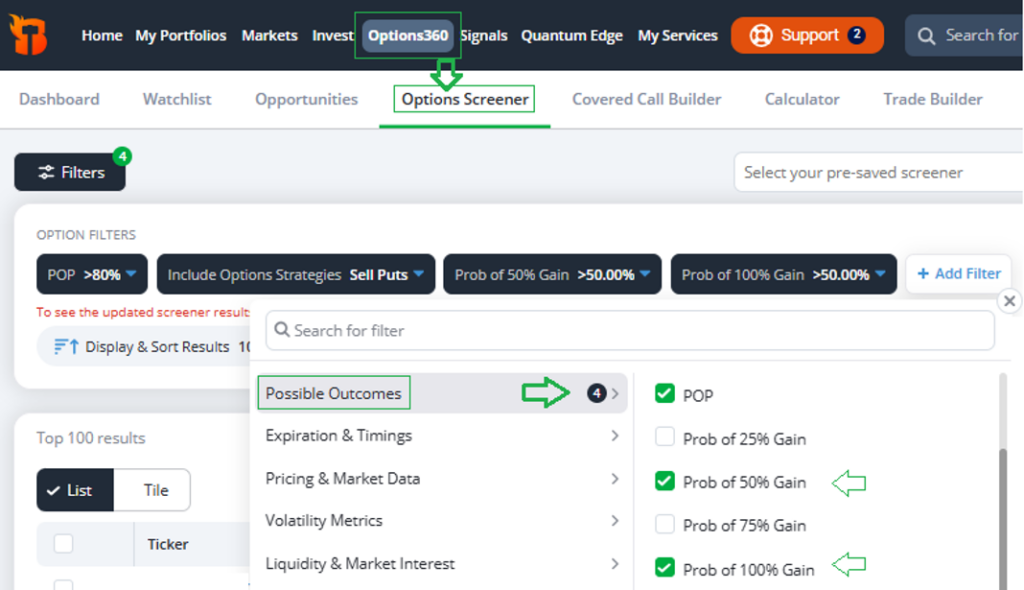
Subscribers to Options360 and TradeSmith Platinum can try out these new updates by logging in to TradeSmith Finance. Just click Options360 from the main menu, and then select the Options Screener tab in the sub-menu.
Next, click the blue +Add Filter button to add a few simple filters, as shown below:
(Please Note: If you don’t see the Options Screener in your TradeSmith Finance platform – and would like to – simply contact our Customer Care team at 888-623-0858 to learn more… or stay tuned for updates later this week!)
You can always add more filters to customize your search and narrow your results down even further, but I kept it simple for this example by only using four filters:
- Starting with POP, which calculates the true probability of earning any gain on the trade, we set the filter to >80%. This will narrow our search down to trades with the highest probability of success.
- Next, we add the Include Options Strategies filter, then set it to the Options360 Sell Puts strategy. This will limit our results to strong put-selling trades identified by the Options360 system.
- Finally, in the Options filter category Possible Outcomes (just below POP), you’ll find the probability of various percentage gains available as new filter options. I chose both Prob of 50% Gain and Prob of 100% Gain.
Again, you can customize the filters, including Underlying Asset Filters (which I didn’t use here), to screen for more or fewer results.
Once you have your filters set, simply click the green Run Screener button to view your results. Also, you can click on the Save button to keep the screener filters for future reference.
When I ran this Options360 screen yesterday, I got over 60 results. Here are the first 10 shown below:
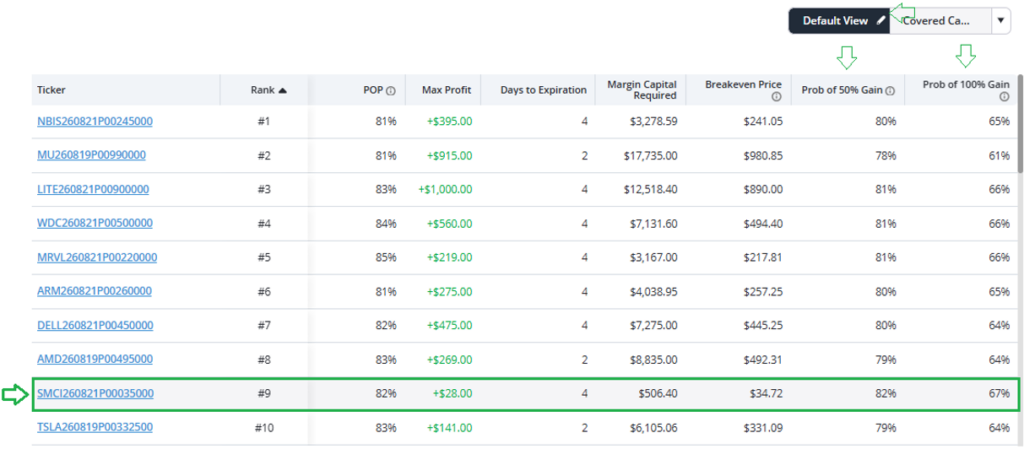
Besides the screener filters, you can also customize how you view the results in the List View format. To do so, simply go to the Default View tab above your screener results and click on the pencil icon, as shown above.
You can change your settings to include the filters below, to display them as permanent columns in your screener results:
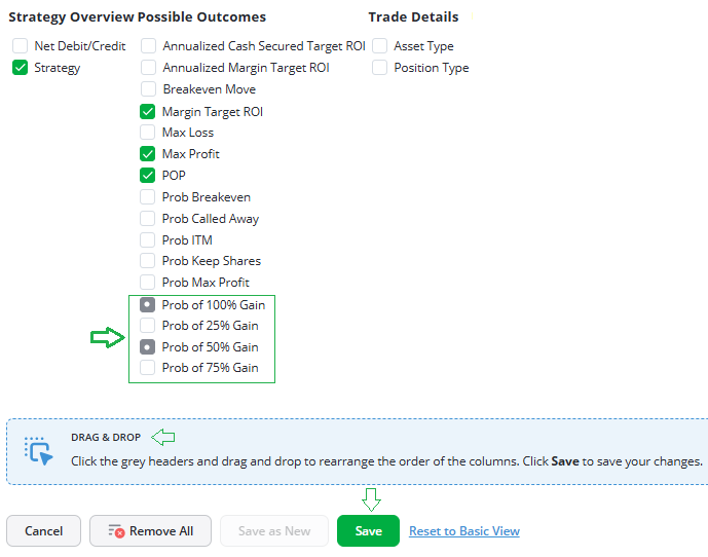
I added Prob of 50% Gain and Prob of 100% Gain, along with a few other columns I prefer.
Going back to the results of my screen, the SMCI Sept. 8, 2026 $35 Put option (SMCI260821P00035000) trade stood out to me.

It has the best combination of a high POP of 82%, plus a high Prob of 50% gain and Prob of 100% gain – at 82% and 67%, respectively.
While this isn’t a guarantee of the trade’s outcome, those are still high odds based on our Options360 algorithm’s calculations – and it gives me confidence that this trade could earn a sizeable profit.
Simply click on the blue highlighted symbol link to find detailed statistics and overview data for this, or any other, potential trade in your screener results.
Mike Burnick’s Bottom Line: With our updated Options360 screener tool, you now have the ability to find potential option trades that give you a realistic shot at doubling in value, rather than just those with a chance of earning any profit at all.
Let’s not be too greedy, though! In addition to screening for trades with odds of achieving 100% gains, you can also dial-in your expectations for trades that could potentially result in gains of 25%, 50% or 75%.
Good investing,
Mike Burnick
Senior Analyst, TradeSmith
P.S. With the latest updates to our Options360 software, you can find trades with the highest calculated odds of success.
When searching for put-selling trades like the results we found today, the new Options Screener filters can help you consistently turn options into a paycheck. But there are plenty of other opportunities in the market you can make use of… as long as you know where to look.
Here at TradeSmith, we believe that everyday investors can benefit from access to cutting-edge, hedge-fund grade technology – and that’s why we’ve been hard at work building new systems, strategies, and tools leveraging the latest advances in AI and machine learning.
The result? A money-making strategy that relies on trading just five stocks at a time, selected by one of our most powerful tools yet.
Click here to learn more about this powerful AI strategy – and how to use it yourself.