Save Money and Reduce Risk with an End-of-Year Portfolio Rebalance
It’s that time of year again!
After today, there will only be 13 and one-half trading days left in 2024.
The stock market has been generous this year, with the S&P 500 Index up over 27% year-to-date. That’s more than twice the average yearly gain over the past several decades. And hopefully Santa Claus will bring further gains, as we close in on his expected end-of-year rally.
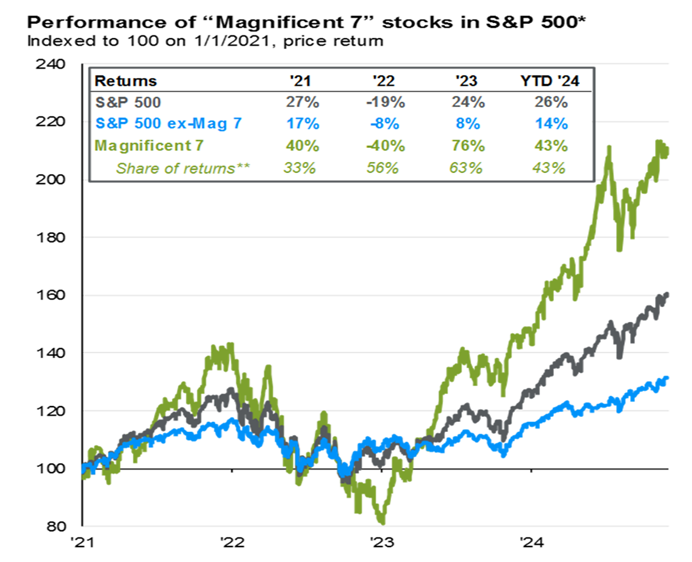
If you owned the “Magnificent 7” tech stocks this year, then you really have a reason to feel the holiday cheer! Those seven mega-cap stocks were up a staggering 43% as of the end of November. Meanwhile, the S&P’s not-so-magnificent 493 stocks have gained just 14%:
Besides the few flashy glamour stocks that have outperformed this year, there’s more to the story beneath the stock market’s impressive surface.
During the first half of 2024, 38% of S&P 500 stocks posted negative returns. And even after a robust second half of the year, 25% of the S&P 500’s component stocks are still underwater year-to-date.
Dig deeper into the large-cap stocks outside the S&P 500, or the various mid- and small-cap stocks across the market, and the number of losing stocks quickly multiply.
Regrettably, I have had a few stinkers in my portfolio this year… and I bet you have, too.
But there is a simple way to deal with this: By using the TradeSmithRisk Rebalancer tool to review your portfolio before the new year. And as an added bonus, you can use those stinker stocks to save some money on your next tax bill – using the time-honored, tax-smart strategy of harvesting a few losses over the next few weeks.
Here’s how to do it.
Holiday Cleaning with the Risk Rebalancer
TradeSmith’s suite of tools and algorithms crunch all the cold, hard data on every stock in our database. Sales, profits, a stock’s trend, volatility, and more – all to give you our rational, unemotional guidance on what to do with every stock in your portfolio: buy, sell, or hold.
And then we go one big step further by suggesting how much of each stock you should hold in your portfolio, so you’re not risking too much of your hard-earned money on any one of them.
Here at TradeSmith, when it comes to managing a stock portfolio, we believe in equal-risk parity. This simply means taking on the same amount of risk in each stock position. What it does not mean is taking the same position size in each stock.
The reality is that every stock has its own “personality” – and different volatility.
Our Risk Rebalancer tool takes a portfolio of stocks and equally balances the investments according to our proprietary risk measures. And that’s the proper way to build a portfolio.
The key to this process is our Volatility Quotient (VQ), a powerful risk-management tool that can help you allocate more money to your lower-risk stocks and less money to your riskier positions.
Essentially, you can think of the Risk Rebalancer as a fancy calculator that helps ensure that you are risking the same percentage of your total portfolio value on each trade, based on each stock’s unique VQ.
It analyzes your current stock portfolio and provides you with an optimal position size for each stock, right down to the exact number of shares of each stock you would need to add or subtract to stay in balance. That’s what we call equal-risk position sizing: it’s a proven way to manage your investments.
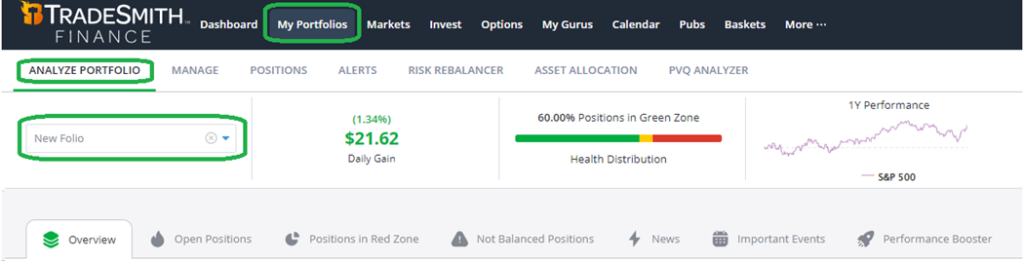
To see if your portfolio is properly in balance using our platform, simply click on the My Portfolios tab from the main menu of your TradeSmith Finance dashboard. If you haven’t added a portfolio to your TradeSmith Finance account, you can do so via the Manage tab – where you can list your positions manually, import a .CSV file from your computer, or even sync our systems with your brokerage account to pull the position data automatically.
From the Portfolios tab, you can select the Analyze Portfolio option to access the Risk Rebalancer. Run your portfolio through the analyzer by selecting it from the drop-down menu.
This takes you to the Overview tab. Here’s what it should look like on your screen:
(Note: Risk Rebalancer is available to TradeStops Premium, Pro, and Lifetime members, as well as Trade360, TradeSmith Essentials, and TradeSmith Platinum members. And as a reminder, mine is a Platinum account, so you may see features here that are not available to you.)
Scroll down and you can see your current portfolio allocation broken down by Health Grade, Stock Rating, and both Sector and Industry allocations.
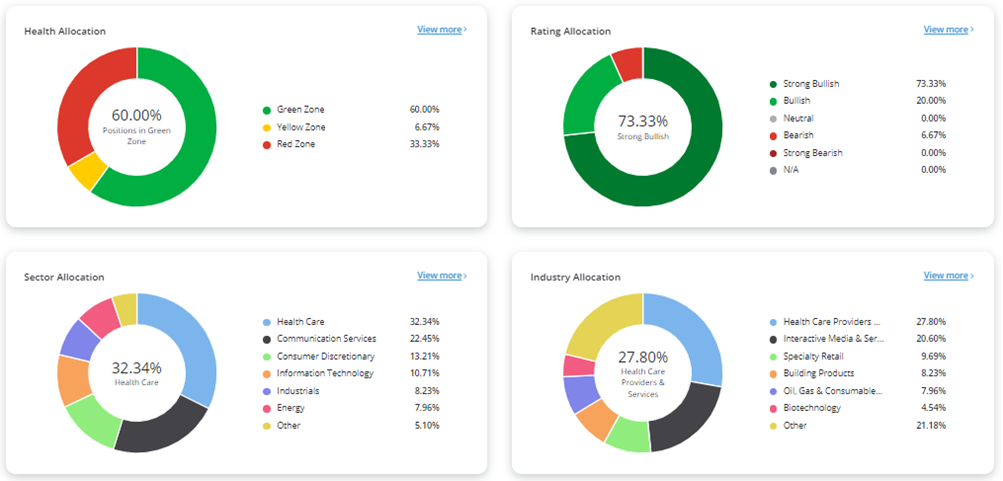
The Overview tab also shows how well your portfolio has performed, and allows you to compare it to an index like the S&P 500 or Nasdaq. Next, the Open Positions tab displays a list of all your stocks with key metrics listed for each, including the Health Indicator and VQ.
Now, click on the fourth tab over, labeled Not Balanced Positions.
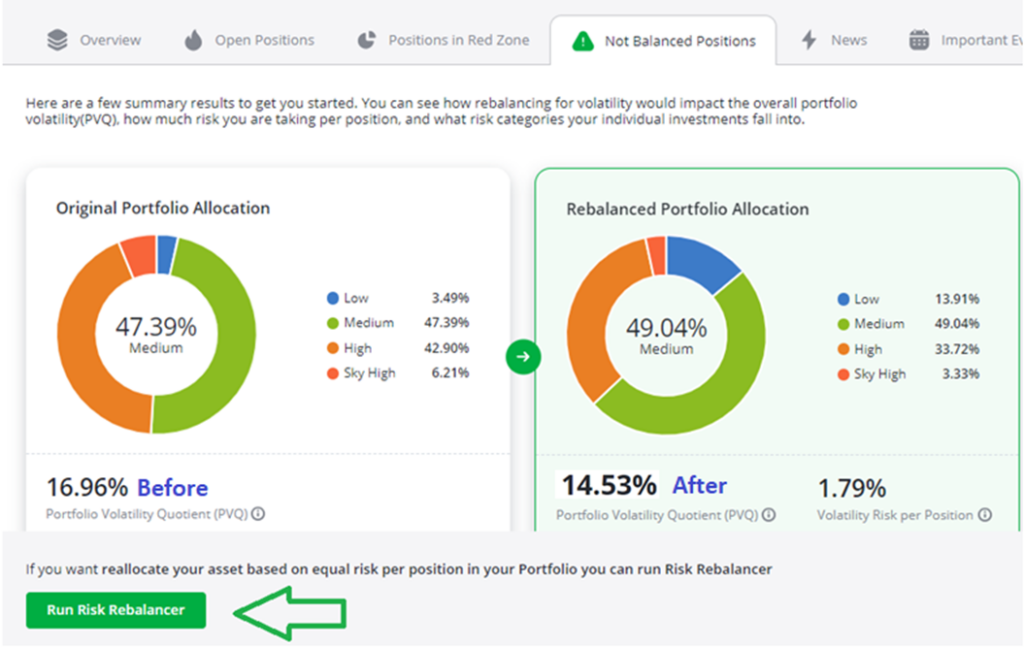
This screen shows whether your portfolio is properly balanced according to risk parity, and it shows how your original portfolio (above left) compares to our suggested rebalanced risk-parity portfolio (at right). In this case, my portfolio isn’t far off the mark from the ideal rebalanced portfolio.
What can I say? I’m a good stock picker.
But you can see that I have a lower allocation to low-risk stocks at just 3.5%, and higher allocation to high-risk and sky-high-risk stocks at more than 50%. I have been known to roll the dice on occasion…
Our algorithm suggests a more balanced approach for my portfolio: by increasing my medium- and low-risk stock allocation, while reducing the riskier holdings, I can get things back on track.
But before running the Risk Rebalancer,there’s one more thing we should do.
I currently hold a few stinker stocks that entered our Health Indicator’s Red Zone. These are perfect candidates for year-end tax-loss harvesting: by selling these positions before the end of the year, the losses on the stinkers in your portfolio can help you at tax time, by offsetting capital gains tax on your winning stocks.
And it’s simple to do it: From the Not Balanced Positions tab, click the green button at the bottom of the screen, labeled Risk Rebalancer. Before moving on, click on the Show Advanced Options toggle next to the Rebalance button – and check the box to Reallocate Funds from positions that are stopped out according to the Health Indicator, as shown below:
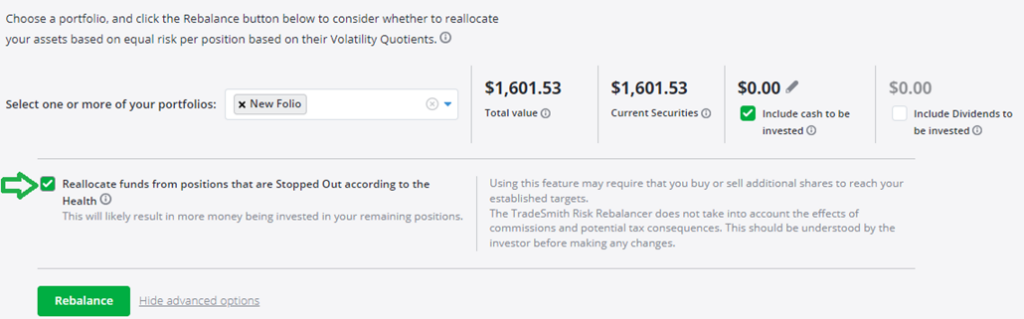
This feature will automatically shift funds from positions that are stopped out and reinvest that cash in your remaining stocks that are healthy. The losses on those sold positions can be written off on your 2024 tax bill – as long as you make the sales before the end of the calendar year. Don’t wait too long, or you’ll regret it in April.
Finally, to see our suggestions on how to get back in balance, just click the green Rebalance button – which will take you to the Rebalance Overview shown below. If the button is grayed out, be sure to select your portfolio from the dropdown above.
I’m using a demo called New Folio for this example. But you can pull up any of your own saved portfolios to follow along. Here’s what the Risk Rebalancer has to tell me:
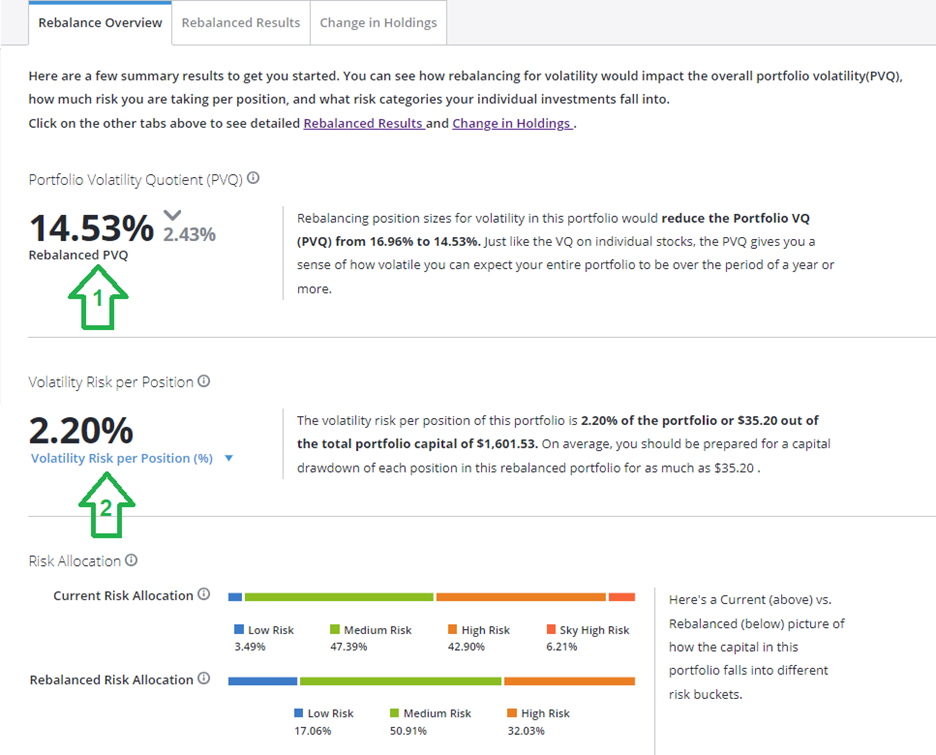
There are two key metrics here to focus on.
1. Portfolio Volatility Quotient (PVQ): Just as we can assess the overall VQ, or risk, of each stock, we can also assess your overall portfolio’s volatility quotient.
TradeSmithdefines the risk of any security (or in this case, your entire portfolio) by the VQ. It represents the security’s normal risk and is based on historical prices.
There are four Volatility Quotient ranges:
- Up to 15% = Low Risk
- 15% to 30% = Medium Risk
- 30% to 50% = High Risk
- Above 50% = Sky-High Risk
There are additional things to consider when looking at the risk of a portfolio. We are not simply averaging out the VQ of each stock to get an overall PVQ.
The portfolio risk not only considers the VQ of the individual stocks, but also considers the correlation between all the stocks in your portfolio. You will typically have a higher PVQ if the holdings are correlated; that is, tend to move up and down together.
When you are diversified, you can potentially hold high-risk securities and still have a lower overall PVQ. My portfolio’s current PVQ is approximately 16.96%. After rebalancing, we reduced the portfolio volatility to approximately 14.53%. A PVQ of 15% or less is considered low risk.
2. Volatility Risk per Position: This can be expressed as a percentage of the entire portfolio or as a dollar amount.
The volatility risk per position for my rebalanced portfolio is 2.2% of the portfolio. In other words, I’m risking just 2.2% of my account’s total value on each stock. Risking 1% to 2% per stock position is typically considered conservative.
Now click on the Rebalanced Results tab to see your new suggested portfolio allocation, as shown in the example below:
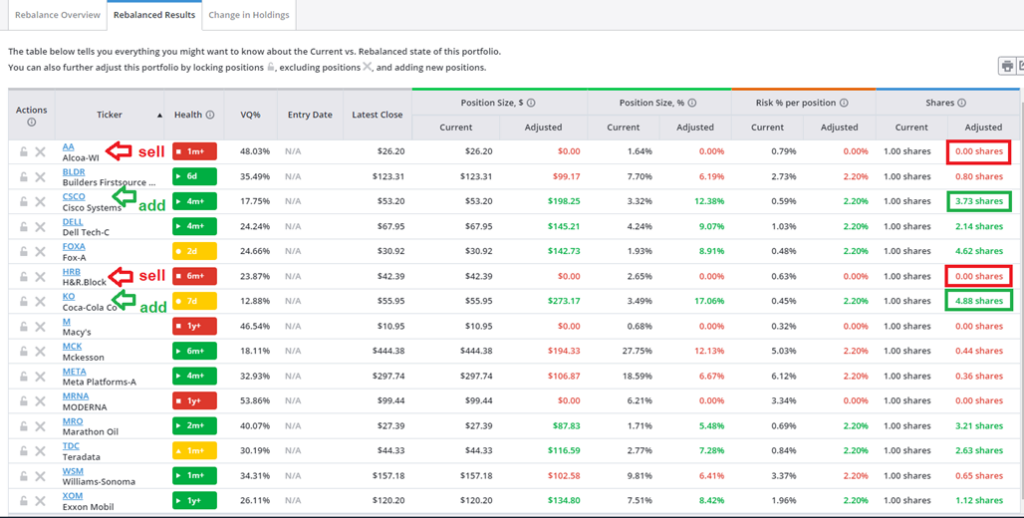
The Position Size columns display the amount of money invested in each position both in dollars and as a percentage.
Numbers in red suggest a decrease in position size, while those in green advise an increase in position size. The Current and Adjusted columns allow you to see a “before and after” comparison at a glance.
The Risk % per position tells you the amount of risk in each stock compared to the value of the overall portfolio. We are risking 2.2% of the entire trading capital per trade. And finally, the Shares column provides your Current share size and how many shares you should have after rebalancing (in the Adjusted column).
Notice that the rebalanced portfolio suggests selling the Red Zone positions. The cash freed up from those sales is spread out among your other healthy stocks according to each stock’s own VQ. The system also suggests reducing the position size of some stocks, also shown in red. Meanwhile, it suggests that lower-risk positions be increased.
You certainly don’t have to make all the suggested portfolio changes, but this is a great thought exercise that can help guide you to a more balanced stock portfolio.
And remember, for each stinker stock you do dump, you earn a tax credit against the taxes you’ll have to pay on your winning stocks.
Mike Burnick’s Bottom Line: Tax-loss harvesting is a smart strategy at this time of year. Our Risk Rebalancer tool can guide you in cutting poor performing or high-risk stocks from your portfolio, with recommendations you can easily follow.
A good rule of thumb is to rebalance your portfolio at least once a year. So, if you haven’t done so already, give our Risk Rebalancer tool a test drive before year end. And remember: There’s only 13 1/2 trading days left in 2024. If you want those tax credits, don’t wait around.
Good investing,
Mike Burnick
Senior Analyst, TradeSmith
P.S. TradeSmith’s Risk Rebalancer is a powerful tool that can help keep your portfolio healthy, but it can only look backwards. When it comes to preparing your portfolio for the future, especially as we look forward to a new year – with a new presidential administration, new interest rates, and new economic trends – you need strategies and tools that work in both rallies and downturns.
Remember that the current rally may not last forever. No market surge is immune to volatility, and history shows that market booms can quickly fizzle out. With winners and losers spread so unevenly across the market, being selective is that much more important to picking new trades.
My colleague Luke Lango, over at our corporate partner InvestorPlace, has been working to develop a solution to this problem. And it’s very impressive indeed.
Luke has spent nearly a year perfecting an incredibly powerful stock screening tool that combines fundamental, technical, and market sentiment factors to identify the next month’s top-performing stocks. He calls it “Auspex.”
Tomorrow at 1 p.m. ET, Luke will reveal this breakthrough system during The Auspex Anomaly Event.
Each month, the Auspex system scans the market for the stocks with the best upward momentum, helping Luke and his team to send tailored trade recommendations that have outperformed the market – no matter if the market is rallying or in a correction.
With the new year approaching fast, it’s more critical than ever to prepare yourself for success in the coming months – and the best way to do that is to sign up for The Auspex Anomaly Event on Wednesday, Dec. 11, at 1 p.m. ET.
Click here to reserve your spot for tomorrow’s event. You won’t want to miss it.