TradeSmith’s Risk Rebalancer Can Set Your Portfolio Straight in 3 Easy Steps
Time flies when you’re having fun! It’s hard to believe 2026 is already half over.
But as we start the second half of this year, now is a great time to review your existing investment portfolio and rebalance.
It’s true: The stock market has been generous so far this year, with the S&P 500 Index up over 9% year-to-date.
But there has certainly been volatility to go along with that climb.
Considering the lopsided stock market performance recently, it’s especially important to consider rebalancing your investments to avoid unexpected risks.
If you’re not familiar with the philosophy behind rebalancing (the TradeSmith way), it simply means that you use our technology to…
- Review the individual risk profile of each stock you own (i.e., how much volatility is normal for that stock)…
- And assess which positions you should reduce (not sell entirely) and which ones you should add to.
All told, this will help “even out” your portfolio. Otherwise, you could have too much money in stocks that could drop dramatically – and not enough money in stocks that are built to weather market storms.
Think of it like this: You wouldn’t bet the same amount of money on something that had a 1 in 100 chance of working out in your favor as you would on one that had a 1 in 1,000,000,000 chance.
That’s why risk-based rebalancing is so important…
And why your handy TradeSmith tools do all the heavy lifting for you.
Here’s how to do it in three easy steps…
Step 1: Use These Tools to Analyze Your Portfolio
Let’s say you own a fair share of technology-related stocks. You’re probably ecstatic about your results this year.
But you’re perhaps a bit nervous too about the potentials risks you’re taking after such a big move.
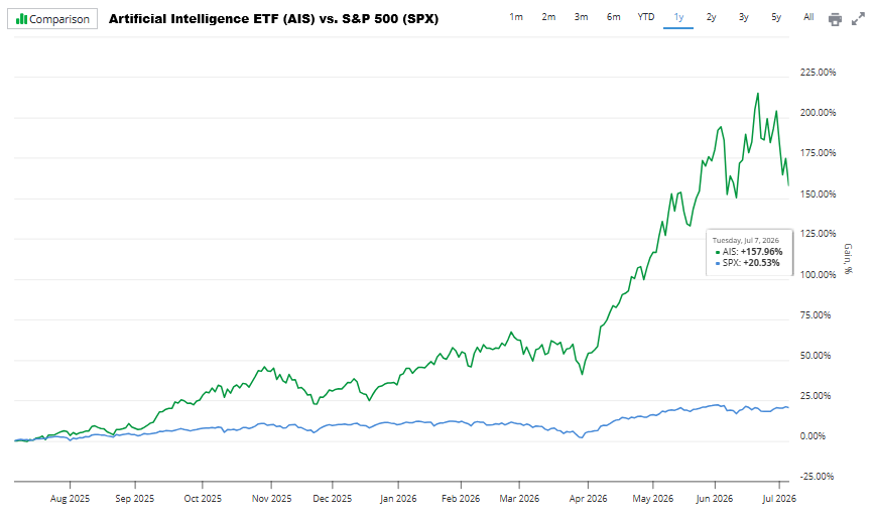
As you can see above, the past year or two has been all about artificial intelligence-fueled growth.
AI and tech stocks have outperformed by a wide margin, leaving the rest of the S&P 500 Index in the dust.
In that case, it’s easy to become unintentionally overweight in higher risk stocks. But there is a simple way to deal with this dilemma.
By using the TradeSmith Risk Rebalancer, you can quickly and easily review your portfolio risk level – and make sure there isn’t too much unwanted volatility lurking among your investment.
The very first step is to pull up your synced investment portfolio in your TradeSmith Finance account. (If you haven’t synced your portfolio yet, I give a detailed walkthrough in a recent issue of Inside TradeSmith here.)
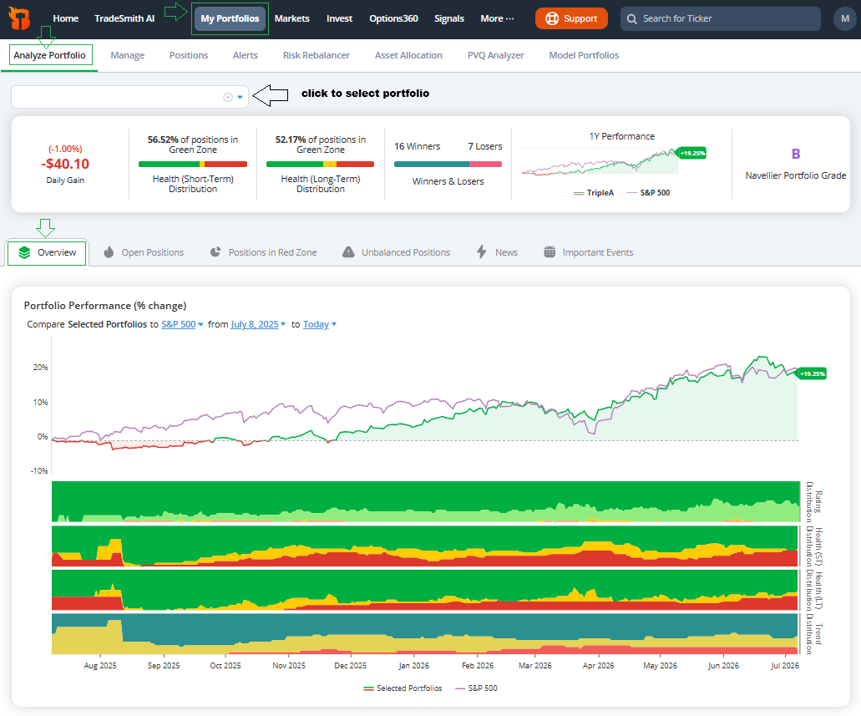
To access your synced portfolio, simply click on My Portfolios from the main menu bar. And from the Analyze Portfolio tab, select your investment portfolio from the dropdown box.
This takes you to the Overview tab as shown below.
(Note: Risk Rebalancer is available to TradeStops Premium, Pro, and Lifetime members, as well as Trade360, TradeSmith Essentials, and TradeSmith Platinum members. If you don’t see this on your dashboard – and would like to – simply contact your Customer Care team at 888-623-0858 to learn more.)
From the Overview page, you can see at a glance how your portfolio stacks up in performance against the S&P 500. You can also quickly see your portfolio allocation by our key TradeSmith metrics including Health (Short-Term and Long-Term), Rating (Strong Bullish to Strong Bearish), Sector, and Industry.
Scroll down a bit further, and you’ll find more detailed allocation data.
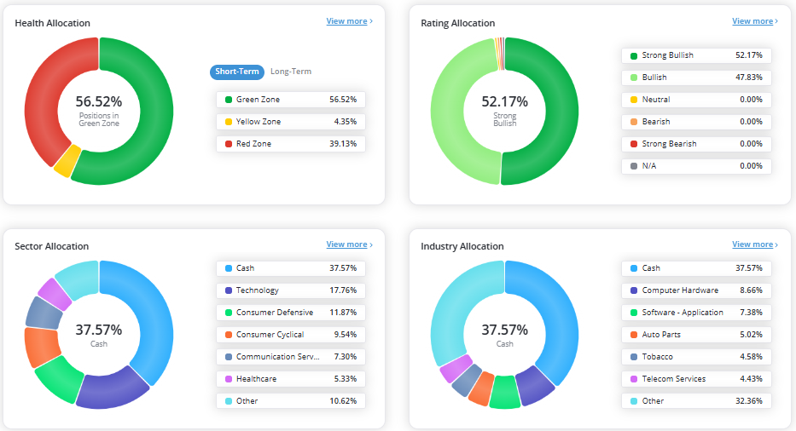
As you can see above, my largest sector allocation is technology stocks at 17.8%, and Computer Hardware is my largest sector allocation at 8.7%.
At TradeSmith, we believe a portfolio should be built for equal-risk parity. This comes down to proper position size, which simply means taking a similar amount of risk in each stock you own.
Step 2: Give Your Stocks A “Personality Test”
The reality is that every stock has its own “personality” – or a different volatility profile. And our proprietary risk metric, the Volatility Quotient (VQ) more accurately measures it.
VQ represents an investment’s normal risk based on historical price trends. There are four VQ ranges:
- Up to 15%: Low Risk (Example: Coca-Cola (KO) = 12.1%)
- 15% to 30%: Medium Risk (Example: M&T Bank (MTB) = 20.5%)
- 30% to 50%: High Risk (Example: Dell (DELL) = 38.1%)
- Above 50%: Sky-High Risk (Example: Sandisk (SNDK) = 79.6%)
And for your entire investment portfolio, the same holds true. Let’s take a closer look by clicking on the PVQ Analyzertabto view your entire Portfolio VQ (PVQ) in more detail, broken down by risk level.
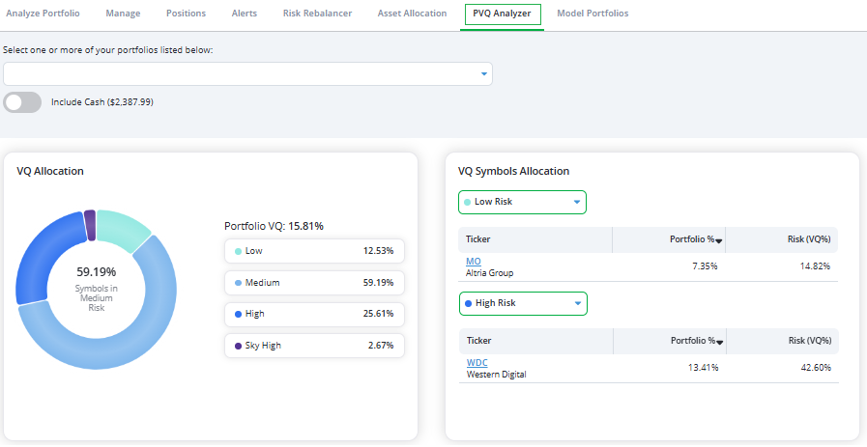
On the left, you can see the PVQ (or overall portfolio risk) broken down by VQ range.
As you can see 59% of my investments at medium risk. But 25.6% are considered high risk, with another 2.7% at sky-high risk levels.
On the right, you can see a detailed overview with individual stock holdings listed by VQ range from low to high risk.
Altria Group (MO), for example, is considered low risk with a VQ of just 14.8%. Meanwhile, Western Digital (WDC) is ranked high risk with a VQ of 42.6%.
And if you have owned stocks like WDC for a while, they may have performed very well for you but are now ranked high risk. That’s why you should consider rebalancing your portfolio periodically to reduce unintended risks.
For more details about the need to rebalance your portfolio, let’s go back to the Analyze Portfolio tab. From the sub-menu, click on the Unbalanced Positions tab.
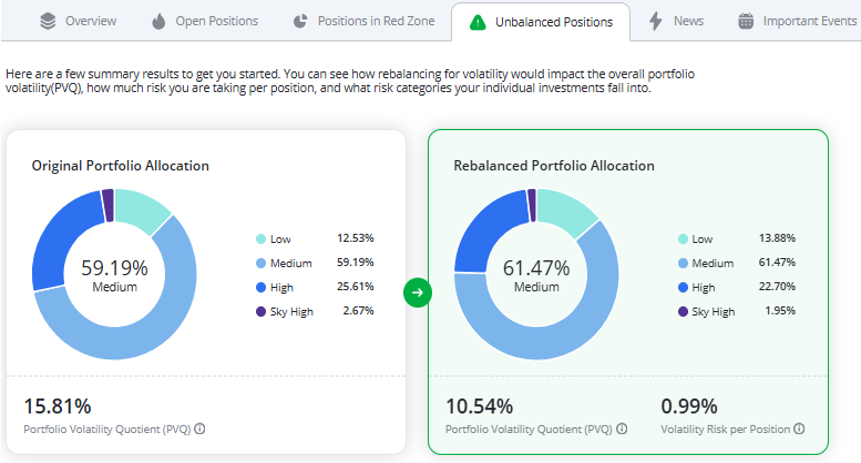
This screen shows whether your portfolio is properly balanced. It also shows how your original portfolio (left) compares to a risk-parity balanced portfolio at right.
In this case, my current portfolio (left) has a PVQ of 15.8%, which is considered medium risk. But I can easily reduce my risk even more, down to a PVQ of just 10.5%, with a rebalanced portfolio allocation shown at right.
This can be accomplished by simply reducing the allocation to positions with High and Sky-High risk in my portfolio.
Scroll down the Unbalanced Positions page a bit further and you can view your portfolio stock positions that are overweight and underweight according to our risk-parity approach, as measured by VQ.
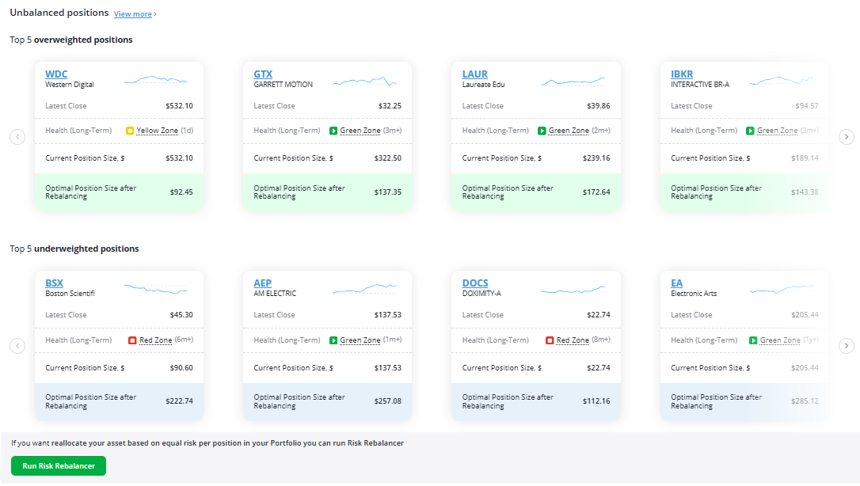
As you can see, my portfolio is overweighted in higher risk stocks like WDC and IBKR. And it is underweight lower risk stocks like BSX and EA.
Our risk-parity algorithm suggests a more balanced approach for the portfolio: by increasing my medium- and low-risk stock allocation, while reducing riskier holdings.
Step 3: Reduce Volatility with Risk Rebalancer
The next logical step is to rebalance your portfolio to reduce the unintended risk in your portfolio. And we make it super easy for you to quickly make it happen with our Risk Rebalancer tool.
This helps you quickly find the ideal balance for each investment in your portfolio according to our risk-management tools. It suggests allocating more money to lower-risk stocks and less money to riskier positions.
The overall portfolio risk (PVQ) not only considers the VQ of each individual position, but it also considers the correlation between all portfolio holdings and helps you better diversify your investments.
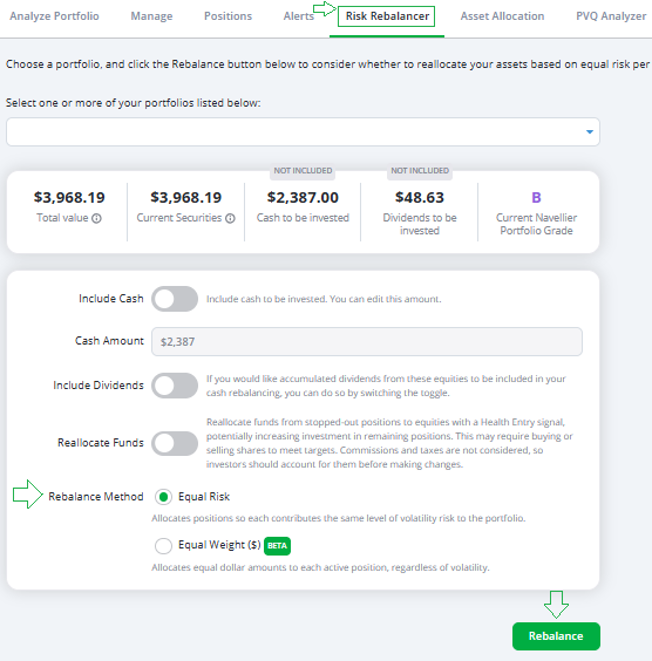
Just click on the Risk Rebalancer tab, and you’ll see a few simple reallocation options.
Then our algorithms take it from there. For your portfolio rebalance options you can choose to…
- Include any spare portfolio cash
- Include accumulate dividends
- Reallocate funds from unhealthy Red Zone stocks to healthy stocks
Once your rebalance options are set, simply click on the Rebalance button. And let’s see what the Risk Rebalancer tells us…
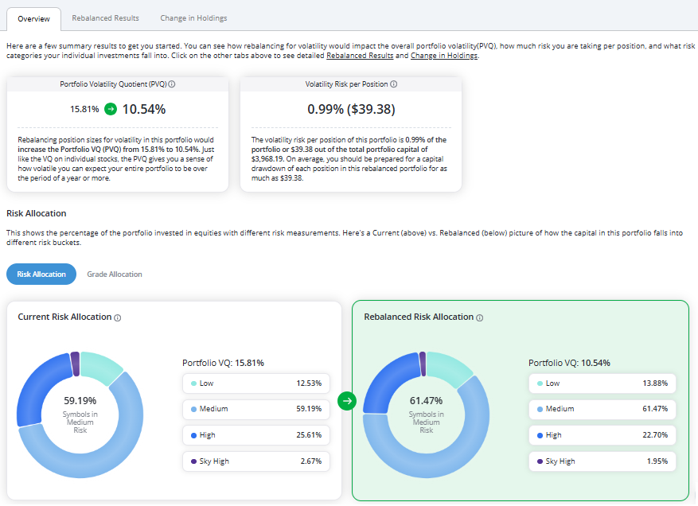
The Overview tab above shows me at a glance that I can reduce PVQ from 15.8% to just 10.5% after rebalancing. Significantly less risky!
You can click on the Rebalance Results tab to see a list of all your portfolio holdings and any suggested changes according to the Risk Rebalancer algorithm.
Or for a quick summary of the rebalanced portfolio, simply click on Change in Holdings.
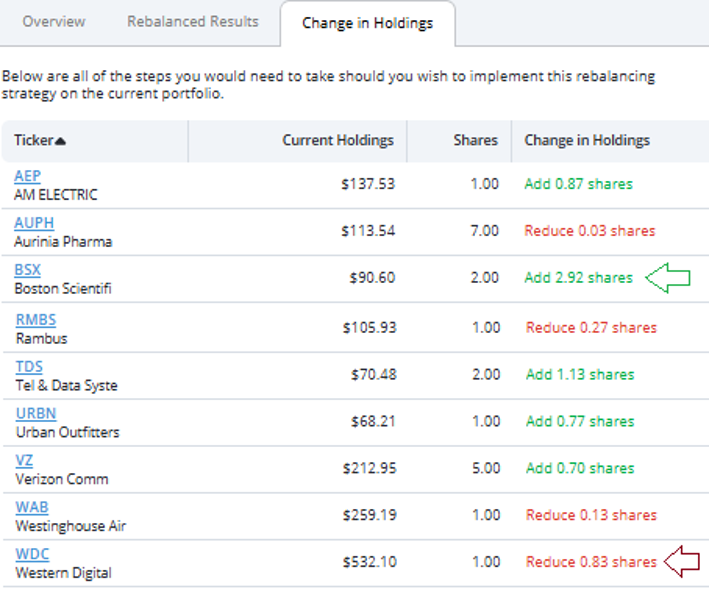
This gives you an easy-to-read summary of any recommended changes to your portfolio. For instance, our Risk Rebalancer suggests reducing holdings in higher-risk stocks like WDC and reallocating that money to lower-risk positions like BSX.
Risk Rebalancer considers the VQ of each individual stock and the correlation between all stocks in your portfolio.
That’s our Risk Rebalancer in a nutshell. At the bottom of the Change in Holdings and Rebalanced Results tabs, you’ll find options to save your results as a new portfolio, print out the results, or export them to a spreadsheet.
You certainly don’t have to make all the suggested changes, but this is a great starting point to help guide you to a more balanced stock portfolio.
Remember, TradeSmithdoesn’t place trades for you. But you can take the results and make any suggested changes with your broker.
Mike Burnick’s Bottom Line: Our Risk Rebalancer tool helps you quickly and easily balance your investments according to our proprietary risk measures. That way you avoid over-investing in higher-risk holdings. And for my money, that’s the best way to build a portfolio. A good rule of thumb is to rebalance your portfolio at least once or twice a year. So, if you haven’t done so already, give our Risk Rebalancer tool a test drive for the second half of 2026.
Good investing,
Mike Burnick
Senior Analyst, TradeSmith