Protect Your Investments Today: Get Real-Time Alerts on Risk and Opportunity
Editor’s Note: The TradeSmith offices – and the markets – will be closed Monday, May 26 for Memorial Day. Regular hours will resume on Tuesday, May 27.
The stock market has been on a wild ride lately, which is no surprise considering some of the mixed messages coming out of Washington, D.C. these days.
For instance, the stock market just produced one of the fastest “roundtrips” I’ve seen in nearly 40 years in the business– from bull market to bear market and back again.
And the chaos and market volatility may not be over yet.
Just this week, Jamie Dimon, CEO of JPMorgan – America’s largest bank – warned that the full impact of tariffs has yet to be felt.
Dimon believes “earnings estimates will come down, which means PE (price-to-earnings) ratios will come down.” In other words, another stock market selloff is possible at any time.
In a climate of chaos and confusion like this, managing your investment risk to protect your downside becomes job #1. And TradeSmith tools can help you do just that.
By simply syncing your investment portfolio, you can easily track the health and performance of every security you own using our flagship TradeStops tool to manage risk.
If you haven’t already done so, securely syncing your brokerage account allows you to easily track all of your investments in one convenient place. It’s a quick and effective way to take more control over your finances – and avoid unnecessary risk.
I covered our Portfolio Syncing tool in detail in a recent Inside TradeSmith column here. It’s a great how-to resource you can follow step-by-step to easily and safely sync your brokerage account with TradeSmith.
Once you’re “in sync,” you can fully capitalize on our TradeStops tool to track of your investments and better manage risk.
TradeStops is based on our unique risk metric: the Volatility Quotient (VQ). It’s the heart of our system, providing custom trailing stops for each security you own. Plus, it helps guide you to the right position size based on each security’s own unique risk profile.
We use three years of historical price data to identify the VQ – the “normal” volatility profile of each security – which is dynamically updated every week based on new market data.
The result: A fully customized VQ trailing stop for every security you hold in your portfolio, based on the unique volatility profile of each one.
This takes a lot of the guesswork out of managing your investments. Instead, you rely on the proven data to help guide and keep you out of harm’s way if a security starts to head south.
TradeStops helps you avoid the biggest investment snare of all: putting too much money into volatile stocks and getting trapped when they continue falling to the downside.
You can quickly set protective VQ trailing stops and Alerts on every security in your portfolio. This takes emotions out of the process and helps maximize your gains.
Set and Forget: Quick and Easy Alerts
Here’s how to quickly set your own VQ stops and Alerts to keep you updated on every security in your synced portfolio:
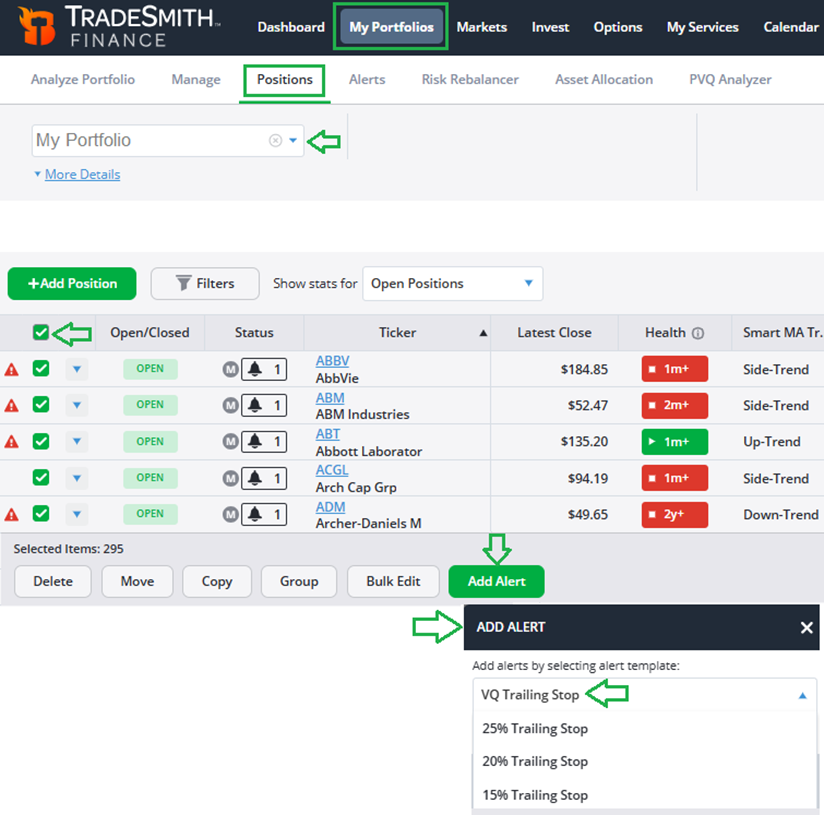
Once your portfolio is synced – or even if you’ve entered your portfolio holdings manually – the fastest way to add TradeStops alerts is from the My Portfolios page under the Positions tab.
Start by selecting your own portfolio using the dropdown menu box on the top left (in this example, it’s labeled My Portfolio). Then, click on the checkbox at the upper left to select ALL positions in your portfolio.
Next, click on Add Alert at the bottom of the page. A dialog box will appear prompting you to add the alert of your choice.
We’ll use our proprietary VQ Trailing Stop, based on the unique volatility of each security. But you can also select from other trailing stop options based on fixed percentages below the latest price, as shown below.
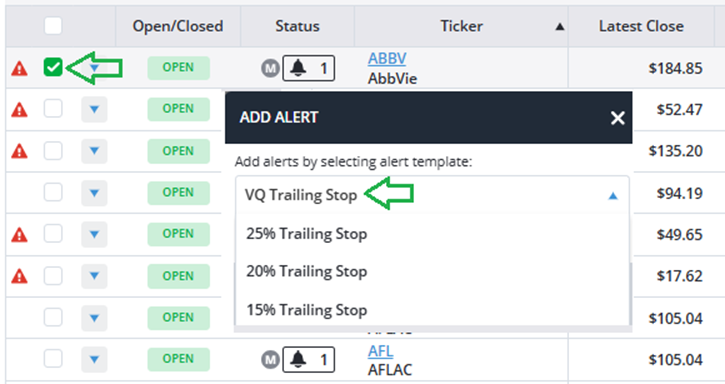
To add or edit stop alerts for individual securities, simply select only the box in the row for that security, then choose your desired stop type from the Add Alert menu.
Now, once you’ve set up your trailing stop alerts, you can easily check the alert status by simply clicking on the Alerts tab, just to the right of Positions, as shown below.
Notice that when the alert bell icon is shaded dark, it indicates the alert has been triggered, as is the case with The Kraft Heinz (KHC) and Weyerhaeuser REIT (WY) in this example below.
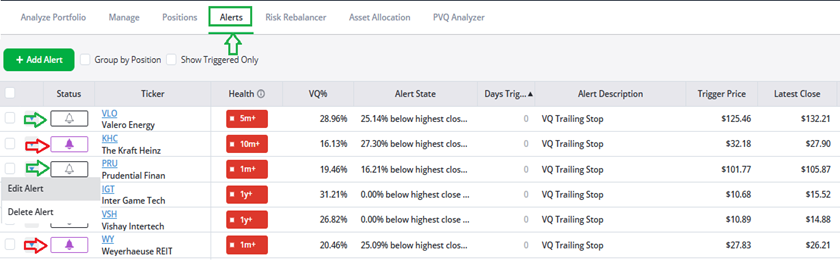
Meanwhile, if the alert bell is unshaded, as with Valero Energy (VLO) and Prudential Financial (PRU), then the alert is still active and has not been triggered.
You can quickly and easily edit or delete your alerts by simply clicking on the down arrow icon to the left of the bell.
Ok, now let’s move on to the really good stuff:
Stay Ahead with Email Alerts
If you’ve been following along at home, you’ve already…
- Synced your brokerage account with TradeSmith Finance…
- And set VQ stop alerts on all your securities to manage downside risks.
Now, the best part of it is that TradeSmith can notify you via email if any security in your portfolio triggers a trailing stop … or any other alert you choose to set up. Here’s how to set it up:
From your TradeSmith account, simply click on your user tab in the upper right corner of the screen, then select Settings, and navigate to Alerts, as shown below.

From the Alert Settings page, as shown below, you can set alerts for any security in your synced or manually saved Portfolios, as well as…
- Watch Only Portfolios…
- My Baskets lists that you’ve set up…
- Newsletter recommendations you follow…
- And the TradeSmith Billionaires Club or TradeSmith Baskets.
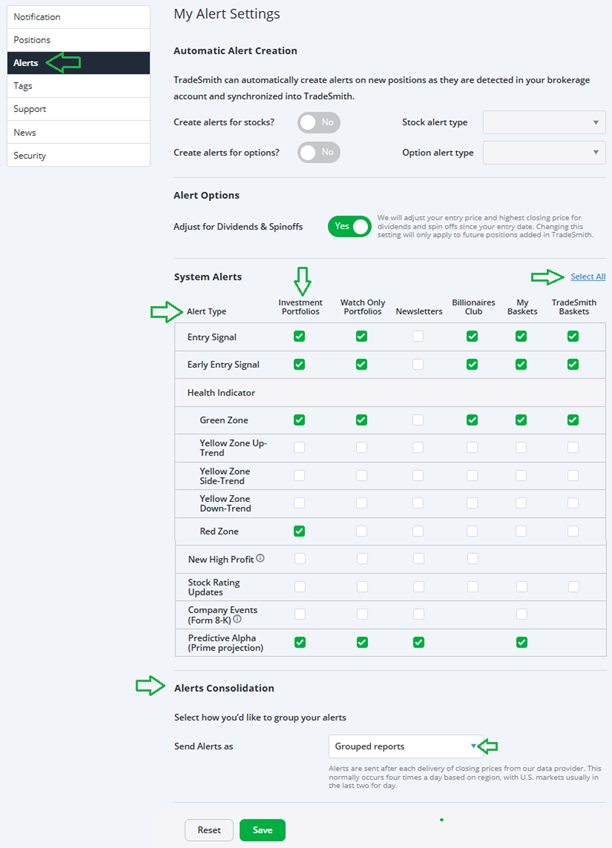
Under System Alerts, simply choose the type of alert you’d want emailed to you from the Alert Type at the left dropdown menu above.
Let’s quickly review each of these alert types:
- Entry Signal: When our Health Indicator moves from Red to Green, it tells us when it’s safe to get into a stockthat was previously stopped out.
- Early Entry Signal: This signal will provide you with a speedier entry point when the security is still in the Red Zone, but our system detects a new uptrend.
- Health Indicator: Our proprietary Green/Yellow/Red-light system that alerts you to health changes in any direction for securities in your portfolio, watch list portfolios, and newsletters you subscribe to.
You can also choose the frequency you want to receive your alerts under Alerts Consolidation by selecting either Grouped reports (to get multiple alerts in one email) or Individual notifications, as shown in the dropdown menu above.
Once set up, you’ll start to receive TradeSmith Alerts Report emails as shown like the example below whenever any security in your portfolio triggers an alert.*
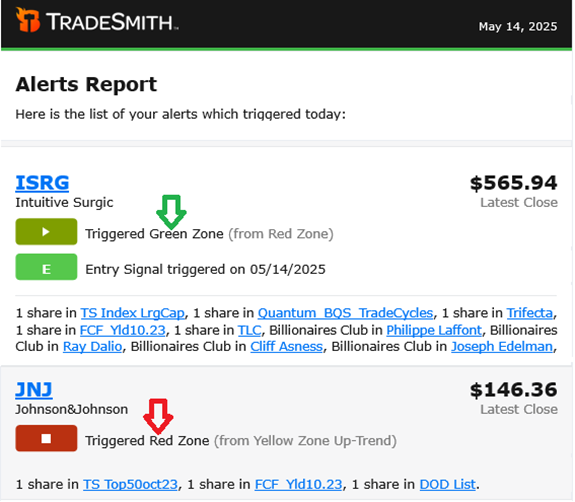
These reports will warn you if a security you hold falls into the Red Zone or triggers any other trailing stop you set. It’s also a great source of new potential trade ideas – especially if you may be considering buying stocks with new entry signals in the Green Zone, or those stocks moving from the Yellow back to the Green, which are often good buy-the-dip opportunities.
Mike Burnick’s Bottom Line: Once your portfolio is securely synced with TradeSmith, and your alerts are set, you’ll never miss any important changes in your investment holdings. Tools like TradeStops were once only available to Wall Street’s elite – but now, we’ve leveled the playing field by making these powerful tools accessible and affordable to all investors. It can help you be a more successful investor by managing your risk to protect you from the downside in markets.
And always, if you don’t see the TradeStops tools on your dashboard – and would like to – please call our Customer Care team at 866-220-1107 to find out more.
Good investing,
Mike Burnick
Senior Analyst, TradeSmith
P.S. With your portfolio synced and email alerts set, you’re already better prepared to stay ahead of sudden market shifts and opportunities – and now, you could go one step further by anticipating where the biggest gains are likely to come next.
That’s exactly what my colleague over at InvestorPlace and legendary investor Louis Navellier aims to do with his latest breakthrough system.
Louis isn’t just predicting market moves – he’s made a career profiting from them.
Using his proprietary Stock Grader system, honed over 47 years, Louis has uncovered 175 stocks that have soared 1,000% or more. In just the first few months of 2024, this same system helped deliver gains of $5,500 on Axcelis, $14,000 on YPF, and even $45,360 on Vista Energy – all without options or high-risk strategies.
Now, he says the biggest opportunity of the decade is already unfolding.
Louis calls it Liberation Day 2.0 – and he believes it could trigger a $10 trillion investment wave. He expects three major announcements from President Trump to unleash a generational economic boom.
His system is already flagging three new stocks he believes could double or even triple in the coming months.
And on Wednesday, May 28 at 1 p.m. Eastern, Louis is hosting a free live event where he’ll reveal his full strategy – including the names and tickers of his top-rated stock picks.
Click here now to reserve your spot – and stay ahead of what’s next.