Give Your Portfolio an Edge in the Market with Our Syncing Tool
It’s a stressful time to be in the markets.
While many of us are avoiding the headlines by shutting down our PCs, tablets, or smartphones, we can’t completely dodge the anxiety-inducing headlines – especially when JP Morgan’s chief economist stated that U.S. recession risk has jumped to 40%… and when that same big Wall Street bank also cut its price target for the S&P 500, warning that recession risk could potentially rise above 50% if more trade tariffs are levied.
I don’t blame you if you’re scared to look at your investments right now. I’m right there with you.
But despite all that’s going on… it’s not all bad news.
TradeSmith started out in 2005 with a handful of tools to help track your positions through trailing stops – so we know a thing or two about managing portfolios through market surges… and the nosedives, too.
So, to cut your stress level and make it easier than ever to track your investments, we have a tool that I recommend for all levels of investors – from the casual traders to the serious risk-takers: the portfolio syncing tool.
By syncing your portfolio, you can easily track all of your investments all in one place – and you’ll be able to spend more time focused on using our proven tools and strategies to find new investment opportunities, and less time worrying about the markets.
Even if you’re not into short-term trading, syncing your long-term investment accounts with our user-friendly My Portfolios feature is a quick and simple way to take more control over your finances.
Once your investments are synced, our TradeSmith tools can help you …
- Closely monitor the risks and potential rewards of every asset you own…
- Track your performance compared to benchmarks like the S&P 500 or Nasdaq…
- Create personalized alerts to notify you of price changes and new opportunities…
- Quickly rebalance your portfolio, so you aren’t overexposed to risky stocks or sectors…
- And set protective stops on your investments to help guard against drawdowns.
And it’s super easy to get started.
How to Add and Sync Your Portfolio – Quickly and Safely
While you always have the option to manually input your investment details, the fastest – and by far the easiest – way to set up your portfolios is by using our automatic syncing feature.
With all your information in one place, you can track all of your holdings – stocks, bonds, mutual funds, ETFs, options, commodities, and cryptocurrencies – without switching browser tabs or brokerage accounts.
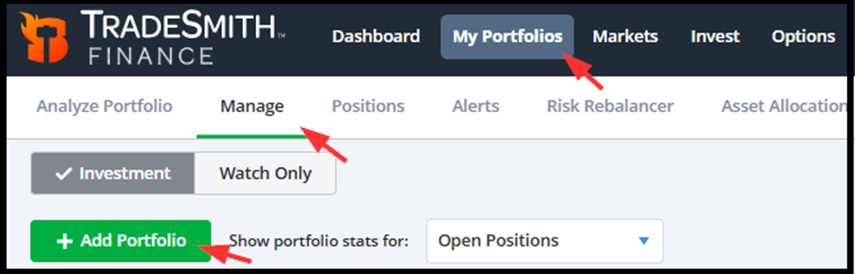
To sync your brokerage account, simply go to the My Portfolios page, choose Manage, and then click Add Portfolio. It’s that easy!
Next, select the Link to Brokerage option.
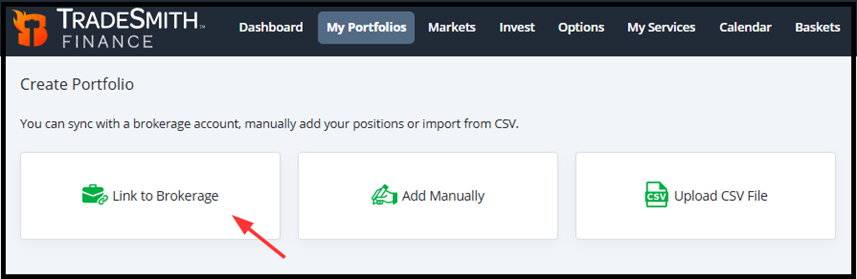
And click Continue to choose your broker. Our portfolio syncing features are handled through Yodlee FastLink – a secure-channel connection service trusted by banks and brokerages across the country.
While we use this service to pull data from your account and sync it with TradeSmith Finance, there’s no need to worry about your security. None of your personal account credentials will be saved to our servers.

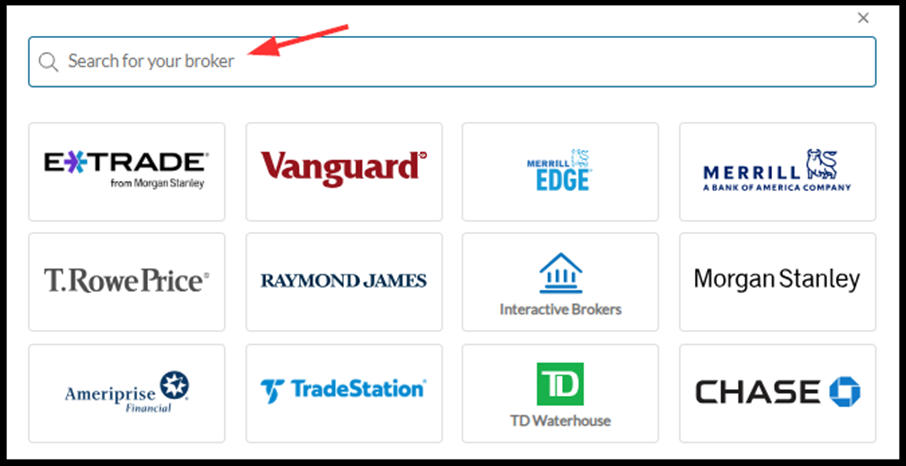
Next, simply select your broker from our list – which features some of the most popular and well-known firms.
If you don’t see an icon for your broker, you can always search for your broker on this page by typing your broker’s name into the search bar at the top of the list.
If you can’t find your broker, we may be able to link it using our alternative data provider. Simply contact our customer support team at [email protected] for details.
Now, making adjustments to a synced portfolio on TradeSmith Finance will not place an order with your brokerage. So, you’re free to experiment and research without fear of accidently placing a trade.
After selecting your broker, simply follow the prompts to complete your portfolio sync with your TradeSmith account.
When you initially sync your broker account, we gather as much information as possible to accurately track all of your investment positions in TradeSmith.
However, some brokers don’t provide us with some of this data. This can happen for a number of reasons, but here are some of the most common…
- The required information is not on the same page within your broker account…
- The position was purchased more than 90 days ago…
- Or the data is returned in a format that is challenging for our program to read.
However, there are usually quick and easy solutions to swiftly sort out any of these data mismatches…
Gather These Data Columns
Almost all of the data columns you can see in your brokerage account are customizable.
If one or more of the columns below are not on your account holdings page, some fields may be missing when the data is passed to TradeSmith Finance. Please include the columns below in your brokerage holdings view…
- Symbol
- Quantity (Shares)
- Value
- Latest Price
- Total Cost Basis
Also, some investment assets imported from your broker may not be recognized by our systems – and these assets may not save correctly. The symbol may differ from the one listed in our database, or it may be one of the few symbols we do not have available in our database.
But you can easily identify any issues by looking for the red triangle to the left of these unsaved positions. And when you hover over the position, you may see the message “Symbol not recognized”, as shown below.
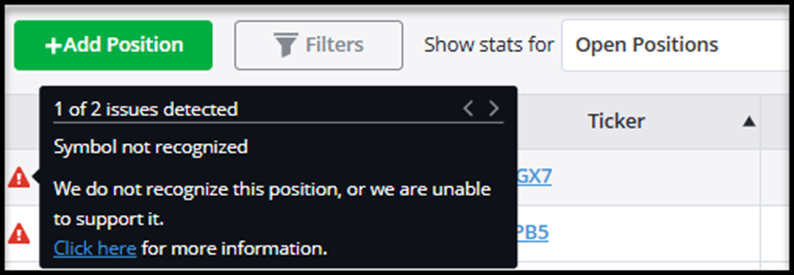
If the symbol differs from the one in our database, it can be saved manually.
- From your Positions page, click the symbol of the position.
- A Confirm Position pop up window will appear, where you can easily search our database that includes tens of thousands of assets by typing the symbol or company name.
- If it’s available, click on the correct symbol or company name and click “Ok”.
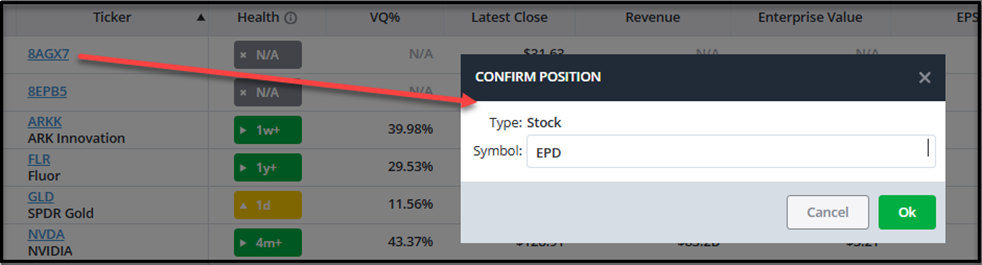
If for any reason you are still not able to find the symbol in our database, don’t fret. If it’s not in our database now, we are constantly expanding the number of assets we track.
In this case, it’s easy to put in a request to add the symbol you are looking for by contacting us at [email protected].
Position Entry Dates and Entry Prices
Entry dates and prices for some assets may not always transfer on the initial import of your account details. That’s because we only receive the most recent transaction history from your broker when syncing via Yodlee FastLink.
But there’s an easy fix: You can add this information yourself.
To add entry dates and prices manually, select the positions in your portfolio by using the checkboxes on the far left of your screen, and use the “Bulk Edit” option. This will allow you to quickly enter your entry dates and entry prices.
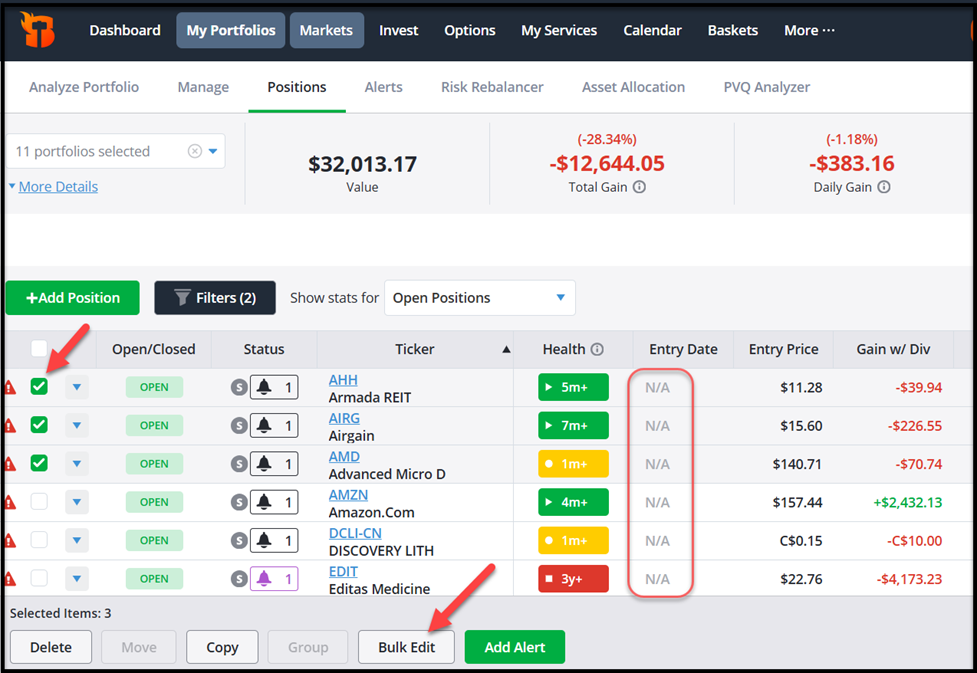
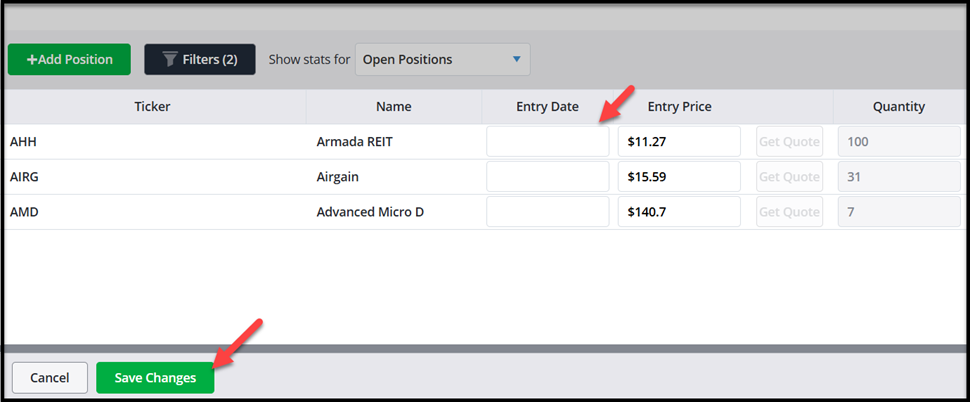
If we receive your purchase transaction correctly, newly purchased positions imported during our daily updates should successfully pull over the entry date.
Simple Data Edits for Options Positions
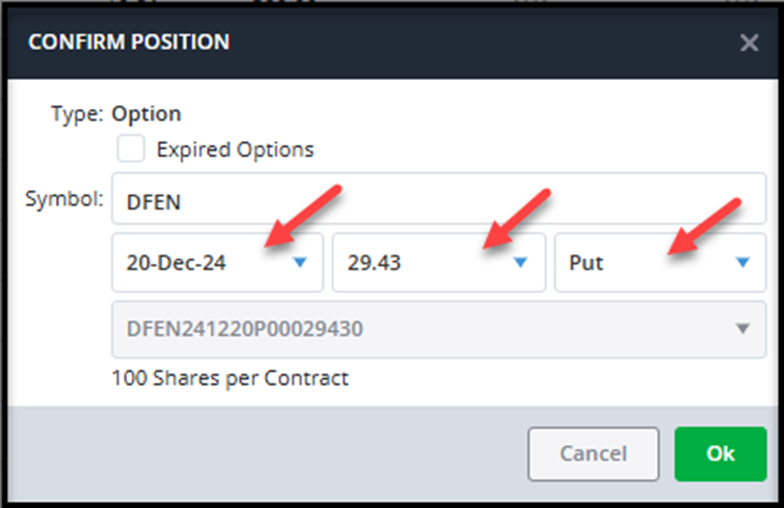
Sometimes, options data can get mixed up in the process of syncing your account with TradeSmith Finance. Details includingthe expiration month, strike price, and whether the contract is a call or put can be missing for synced options positions.
That’s because brokers format options data differently.
If we do not get compatible information from your broker, your option will appear with just the underlying stock symbol in the option symbol field. But there’s an easy workaround.
By simply clicking the symbol, you will be able to manually enter any missing data to save your full option symbol correctly…
You’re Now “In Sync”
Now that you’re all synced, here’s what your portfolio will look like on the TradeSmith My Portfolios page:
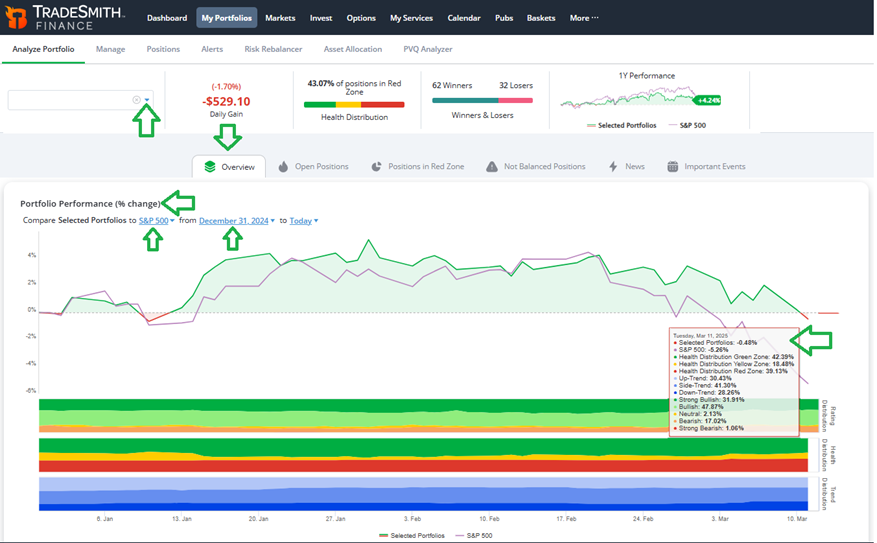
Once you are finished syncing, simply click on the My Portfolios tab from the main menu bar. Then click on the dropdown box at upper left to select your portfolio.
On the Analyze Portfolio tab, you’ll see a quick account overview including your performance compared to a benchmark like the S&P 500.
Click on any date on the performance chart to see how you’re tracking compared to the benchmark. Plus, you’ll see your portfolio allocation broken out by key TradeSmith metrics…
- Health distribution (green, yellow, and red zones)…
- Trend distribution of your stocks (up-, down-, or side-trend)…
- And ratings distribution of your holdings (ranging from strong bullish to strong bearish)
You’ll know where you stand at a glance in performance, the health distribution of your portfolio, and your count of winners and losers.
Scroll down from there for more detailed data on your holdings with our TradeSmith exclusive health and ratings allocation. You can also get specifics on your sector and industry allocation, plus detailed volatility statistics on every asset you own, to better manage risk.
Next, click on the Open Positions tab to the left of Overview.
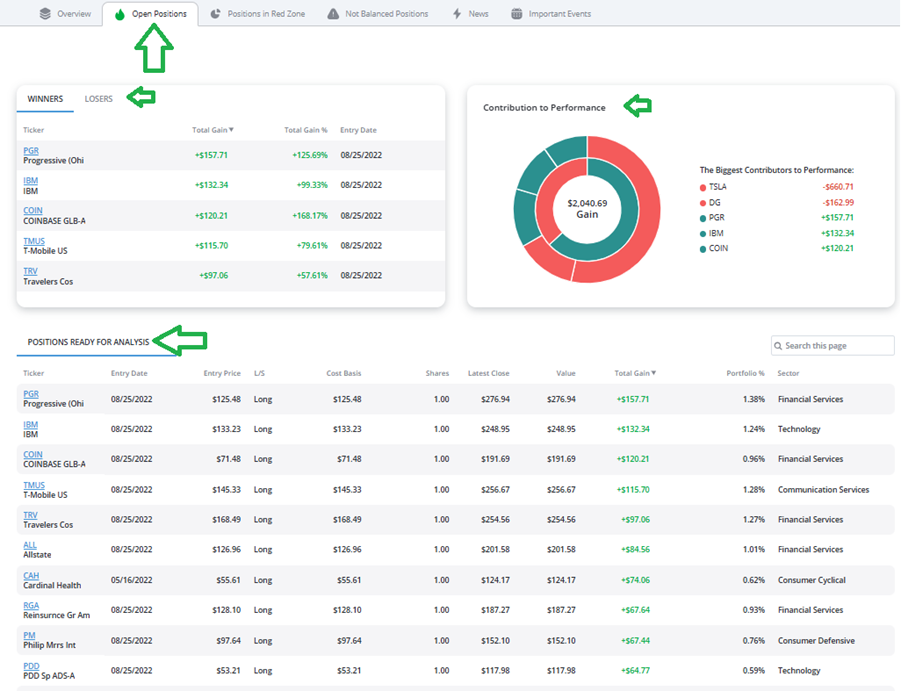
On this tab you can quickly assess your top winners (and losers) in your portfolio, plus see the biggest contributors to (or detractors from) your performance.
Scroll down further for a detailed analysis view of each and every asset you own. You can sort this list by ticker, entry date, total gain, the percent allocation in your portfolio, and much more.
Other TradeSmith My Portfolios tabs allow you to…
- Quickly spot positions in the health indicator red zone, that you may want to cut…
- The latest news on your portfolio holdings…
- And a calendar view of key events like earnings announcements and dividend payout dates.
Getting synced means simplifying your investments, avoiding possible risks and above all, uncovering new money-making opportunities quickly. You’ll spend less time switching among multiple broker website and have more time to easily manage your money with TradeSmith.
Mike Burnick’s Bottom Line: Save more of your valuable time by automatically syncing your brokerage account with TradeSmith Finance. That way you can easily keep track of your investments all in one place. Plus, you can set alerts, protective stops, and get notified as soon as anything changes. TradeSmith’sPortfolio Syncing Tool: It’s the less-stress way to trade and invest!
Good investing,
Mike Burnick
Senior Analyst, TradeSmith
P.S. While it isn’t easy to watch your hard-earned investments whip up and down with the market like the latest “World’s Most Nauseating Rollercoaster,” keeping your eye on the bigger picture of your portfolio’s health with TradeSmith’s portfolio syncing tool can help make those brutal dips and whipping turns far less daunting to endure.
And truthfully, any edge in a market like this is a good one – and with a radical new AI innovation that’s surfaced in the world of finance, striking while the iron is hot is the way to go.
Hearing about AI right now probably comes as a surprise. After all, ChatGPT rocked the world more than two years ago now, and we see AI-generated images and the “next best” AI trading tool in every other email.
But AI is far more advanced than most investors realize.
And my friend and colleague over at InvestorPlace, Louis Navellier, is tracking the next wave of the AI revolution closely.
He says that what’s coming is going to blindside millions of Americans – and could ravage your retirement savings if you’re not prepared.
The good news, Louis tells me, is you still have time to position yourself correctly — but only if you act fast.
To give investors that edge we all covet in the markets, Louis recorded an urgent new video with everything you need to know about this new breakthrough.