Uncover New Earnings Season Trades with This TradeSmith Screener
All right, folks – it’s that time of year again: Second-quarter earnings season has officially arrived, as the big money-center banks and a few other major market names reported earlier this week.
And as always, there will be plenty of winners and losers this season.
Upside earnings surprises, and especially upbeat forward guidance, will be rewarded by investors as the results roll in over the next few weeks. Meanwhile, downside surprises and lower forward profit estimates will be severely punished – as underperforming stocks get dropped.
The key is to take advantage of the earnings season winners and avoid the losers… But how?
In today’s Inside TradeSmith, I’ll show you: There’s an easy way to scan for both the earnings winners and losers to be – all by using a simple TradeSmith Screener.
But first, let’s take a moment to review…
In Tuesday’s column, I showed you how to use our TradeSmith Calendar feature to keep tabs on upcoming earnings reports:
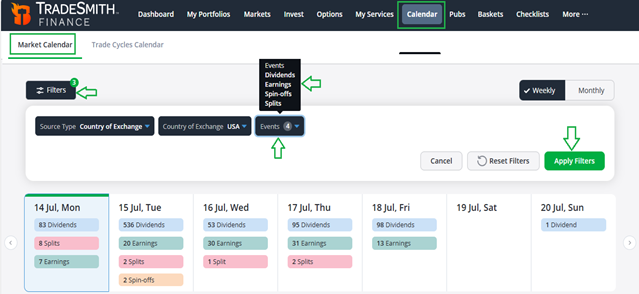
Another way to do this – and create a watchlist of stocks with upcoming earnings at the same time – is by using our powerful TradeSmith Screener tool.
Find Your Upcoming Earnings Trades with the TradeSmith Screener
After logging into your TradeSmith Finance dashboard, simply click on Invest from the main menu bar, then click on the Screener tab on the following page.
Now, here’s how to set up your own earnings season stock screener:
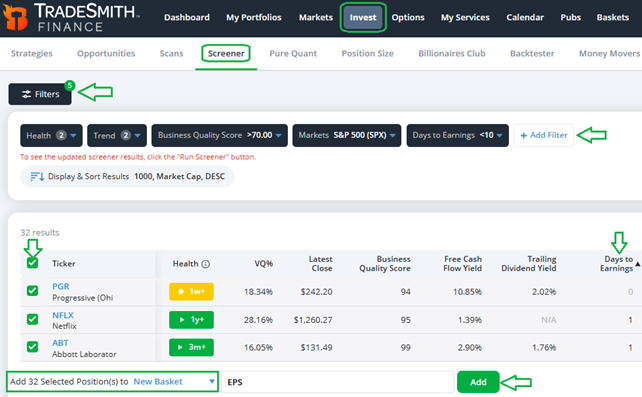
As shown above, you’ll need just five filters for this screener. Simply start by clicking on the + Add Filter button at the upper right, then add these filters.
- Health: Set to Green Zone or Yellow Zone,
- Trend: Select Up or Sideways trend,
- Business Quality Score: Set this to “more than 70,”
- Markets: Select S&P 500 (SPX),
- And Days to Earnings: Set to “less than 10” – you’ll find this in the Key Events filter category.
If you wish, you could even exclude the first three filters entirely – and just look for earnings reports coming up from any S&P 500 component company.
But I always like to start my screeners with healthy, high-quality stocks that aren’t trending down. These companies may not be immune to earnings season volatility, but they can be easier to plan trades for.
Also, you don’t have to limit your search to just the stocks listed in the S&P 500, healthy or otherwise. You can choose any other index under the Markets filter, to focus on any group of stocks that you’d like.
Or: You can simply select the Asset Type filter instead of the Markets filter – and set it to Stocks to cast an even wider net, and search for upcoming reports from stocks in any (or no) index!
However you choose to customize it, this screener will show you the qualifying stocks that have earnings release dates over the next 10 days.
You can see a partial list of results in the screenshot above: When I ran the screen for myself yesterday, I got 32 stocks that qualified. That included Progressive (PGR), which reported its earnings results last night, as well as Netflix (NFLX) – which just reported earlier this evening.
Now, let’s take things one step further, and create your own personal earnings season watchlist.
After reviewing your screener results, you can place some or all of the stocks in your results into a New Basket, to save the list for later review. Simply click the checkbox next to the Ticker field at the top left of the results window to select all of your results at once – or check individual boxes to select just the stocks you want to save to your watchlist.
After selecting your results, you’ll be prompted to add the stocks into a Basket as shown below:
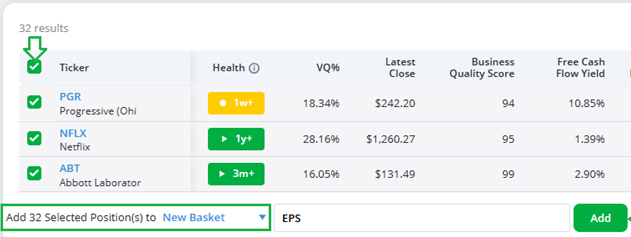
At the bottom of the page, you’ll see all 32 tickers are ready to be saved into a Basket. You can click the text box to name the new Basket as you’d like: I named mine EPS.
Once you’ve chosen a name, be sure to click the green Add button to save your basket.
Now you can check in on your earnings season basket every day after the market opens.
Simply click on Basket from the main menu bar, and you’ll find all your saved baskets at the top of the following page, under My Baskets. Scroll down and you can also explore several popular pre-set TradeSmith Baskets.
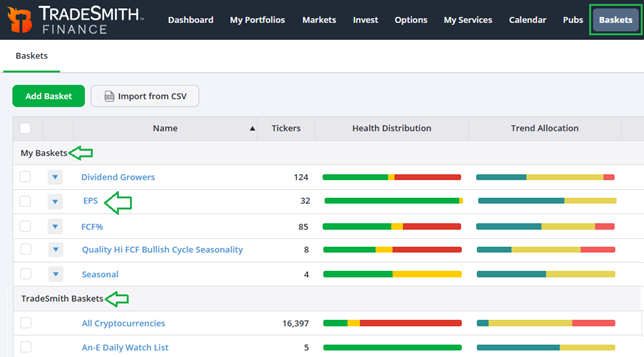
Once you locate the right basket (EPS, in this case) simply click on it to view the entire basket – your new watchlist of stocks set to report earnings over the next 10 days.
I open one of these baskets each morning, and click on the Days to Earnings tab (the fifthcolumn below) to sort the list, as shown below. That way the most recent earnings reports are at the top:
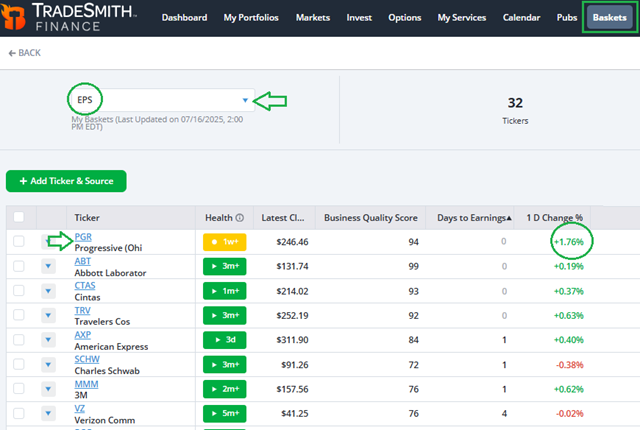
In the next column over, you’ll see the 1 D Change % column, tracking performance. This can alert you if a stock that just reported made a big gap move – up or down.
That’s a sure sign of a positive or negative earnings surprise.
Your next steps may be to do some additional homework on any stocks with positive surprises.
Simply click on the ticker symbol from the basket, and that will take you to the stock’s Asset Details page. It’s as simple as that!
From here you can dig deeper to analyze the company and its upside prospects… or revealed weaknesses:
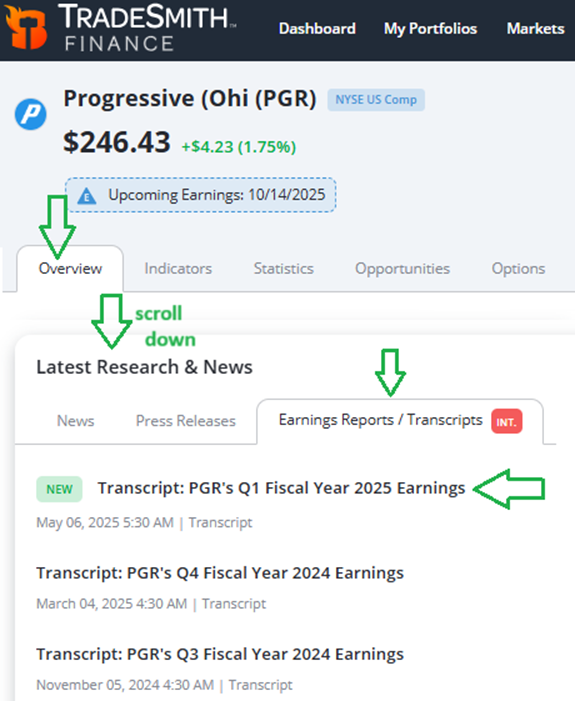
A great starting point is checking out the Earnings Reports / Transcripts section of the Overview tab. Scroll down a bit on that page, and you’ll find this handy feature under “Latest Research & News.”
Mike Burnick’s Bottom Line: Each new earnings reporting season brings a new slate of market winners and losers. Using TradeSmith tools like our Earnings Calendar, Screener, and Watchlist Baskets, you can easily keep tabs on the rapid-fire earnings releases… and uncover new potential trades among the stocks that have posted – or are set to post – new results.
Good investing,
Mike Burnick
Senior Analyst, TradeSmith
P.S. Earnings seasons come and go each quarter, year after year – bringing higher volatility and surprise price moves along with it. And while we can’t see the future and know exactly how each stock will move after posting its latest results, we can get a glimpse at where those stocks are headed.
It’s all thanks to TradeSmith’s breakthrough seasonality algorithms: We’ve unlocked the power of the market’s historical data to uncover the repeating cycles that drive stocks year after year.
The crown jewel of our seasonality software is the Seasonal Edge trading system – which scans the market for the most optimal periods to trade a stock and tells you exactly when to enter a trade for the best potential results… to the day.
Recently, our seasonality data has been throwing out warning signs: According to our systems, there’s a major shift in market trend coming as soon as July 30 – and it could spell disaster for any investor or trader not prepared for it.
These warnings have caught the attention of everyone on Team TradeSmith, but no one has been more concerned than our CEO, Keith Kaplan. He’s determined to get the word out – and so he’ll be going online Wednesday, July 22, at 1:00 p.m. Eastern with a special presentation on this upcoming seismic shift.
I’ve covered Seasonal Edge and our seasonality tools plenty of times in Inside TradeSmith, but if you haven’t gotten your hands on this powerful system, now’s the time: As part of his presentation, Keith is giving the public a chance to demo our seasonality tools to make sure they’re familiar ahead of time.
Click HERE to reserve your spot for the event.You won’t want to miss it.