Get Your Portfolio in Sync with TradeSmith
Editor’s Note: The TradeSmith offices are closed for an extended year-end period that began Tuesday, Dec. 24. Our regular hours will resume on Thursday, Jan. 2, 2025. Our Customer Service team will be unavailable by phone during this period, but can be reached by email only on Dec. 26, 27, 30, and 31. Inside TradeSmith will be back as scheduled on Dec. 31. Happy Holidays!
As they say, time is money.
And our TradeSmith Finance platform can make it super easy for you to save time, by automatically synchronizing with your brokerage account portfolio. By letting our systems keep track of your investments as you make them, you can spend more time focused on your portfolio and strategy – and hopefully, make more money in the process!
And even if you aren’t trading frequently, syncing your investment accounts and managing your portfolio with our user-friendly platform is an easy way to take more control over your finances.
That way you can spend less time switching among multiple websites, and you’ll have more time free to use our TradeSmith tools and strategies to uncover new investment opportunities.
And without doubt, the most important task for every investor is managing risk. When synced with your investment account, our TradeSmith tools can help you to…
- Closely monitor the risks and potential rewards of every asset you own.
- Track your portfolio performance compared to benchmarks like the S&P 500 or the Nasdaq.
- Create personalized alerts to notify you of price changes and new opportunities.
- Quickly find ways to rebalance your portfolio, so you aren’t over-exposed to risky assets or sectors.
- Set protective stops on your investments to help guard against unnecessary drawdowns.
How to Add and Sync Your Portfolio – Quickly and Safely
While you always have the option to manually input your investment details into a new TradeSmith Finance portfolio, the fastest – and by far the easiest – way to set up your portfolios on TradeSmith Finance is by using our synchronizing feature.
You can easily track all of your holdings – stocks, bonds, mutual funds, ETFs, options, commodities, and cryptocurrencies – all in one convenient place, getting the details sorted with the click of a button.
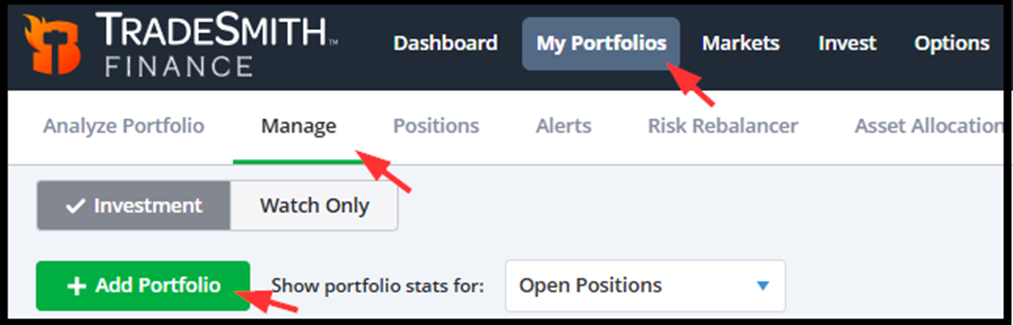
To sync your brokerage account with TradeSmith Finance, simply go to the My Portfolios page, and then choose Manage. Then click Add Portfolio.
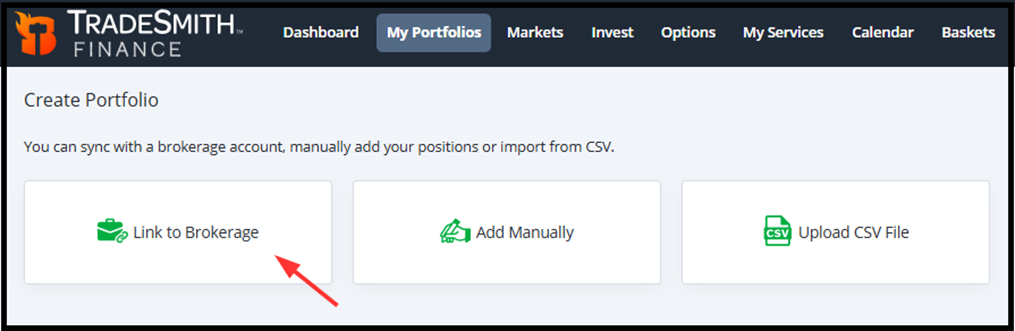
Next, select the Link to Brokerage option.
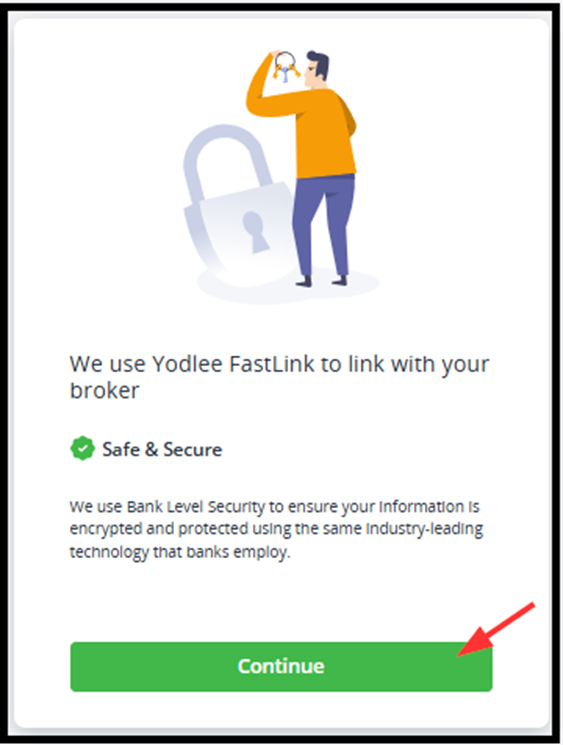
And click Continue to choose your broker.
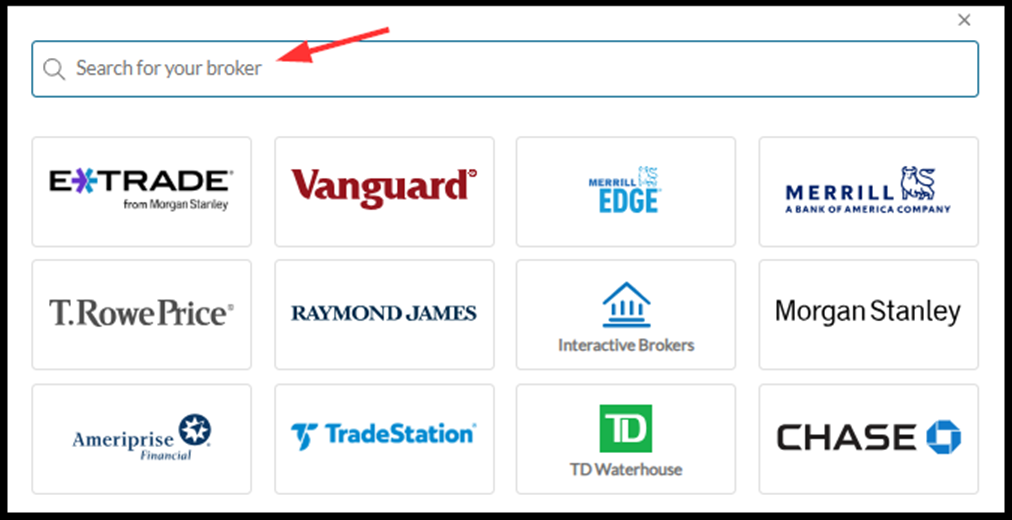
Next, just select your broker from our list – which includes some of the most popular investment firms on the market. If you don’t see an icon for your broker, you can always search for your broker on this page by typing your broker’s name into the search bar at the top of the list.
Our portfolio synchronization features are handled through Yodlee FastLink – a secure-channel connection service trusted by banks and brokerages across the country. And while we use this service to pull data from your account and synchronize it with TradeSmith Finance, there’s no need to worry about your security. None of your account credentials are saved to our servers.
Likewise, making adjustments to a synced portfolio on TradeSmith Finance will not place an order with your brokerage. So, you’re free to experiment and research without fear of making a trade error.
If you still have a hard time finding your broker listed, we may be able to link it using our alternative data provider. Please contact customer support at [email protected] for details.
After selecting your broker, simply follow the prompts to complete your portfolio sync with your TradeSmith account.
Now, when you initially synchronize your broker account, we gather as much information as possible to accurately track all of your investment positions in TradeSmith.
However, some brokers don’t provide us with some of this data. This can happen for a number of reasons, but here are some of the most common…
- The required information is not on the same page within your broker account…
- The position was purchased more than 90 days ago…
- Or the data is returned in a format that is challenging for our program to read.
However, there are usually quick and easy solutions to swiftly sort out any of these data mismatches. Here’s how.
First: Gather These Data Columns
Almost all of the data columns you can see in your brokerage account are customizable. If one or more of the columns below are not on your account holdings page, some fields may be missing when the data is passed to TradeSmith Finance. Please include the columns below in your brokerage holdings view…
- Symbol
- Quantity (Shares)
- Value
- Latest Price
- Total Cost Basis
Also, some investment assets imported from your broker may not be recognized by our systems – and these assets may not save correctly. The symbol may differ from the one listed in our database, or it may be one of the few symbols we do not have available in our database.
But you can easily identify any issues by looking for the red triangle to the left of these unsaved positions. And when you hover over the position, you may see the message “Symbol not recognized”, as shown below:
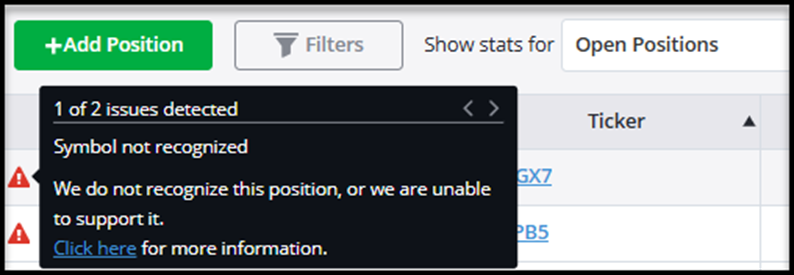
If the symbol differs from the one in our database, it can be saved manually.
- From your Positions page, click the symbol of the position.
- A Confirm Position pop up window will appear, where you can easily search our database that includes tens of thousands of assets by typing the symbol or company name.
- If it’s available, click on the correct symbol or company name and click “OK.”

If for any reason you are still not able to find the symbol in our database, don’t fret. If it’s not in our database now, we are constantly expanding the number of assets we track.
In this case, it’s easy to put in a request to add the symbol you are looking for by contacting us at [email protected].
Position Entry Dates and Entry Prices
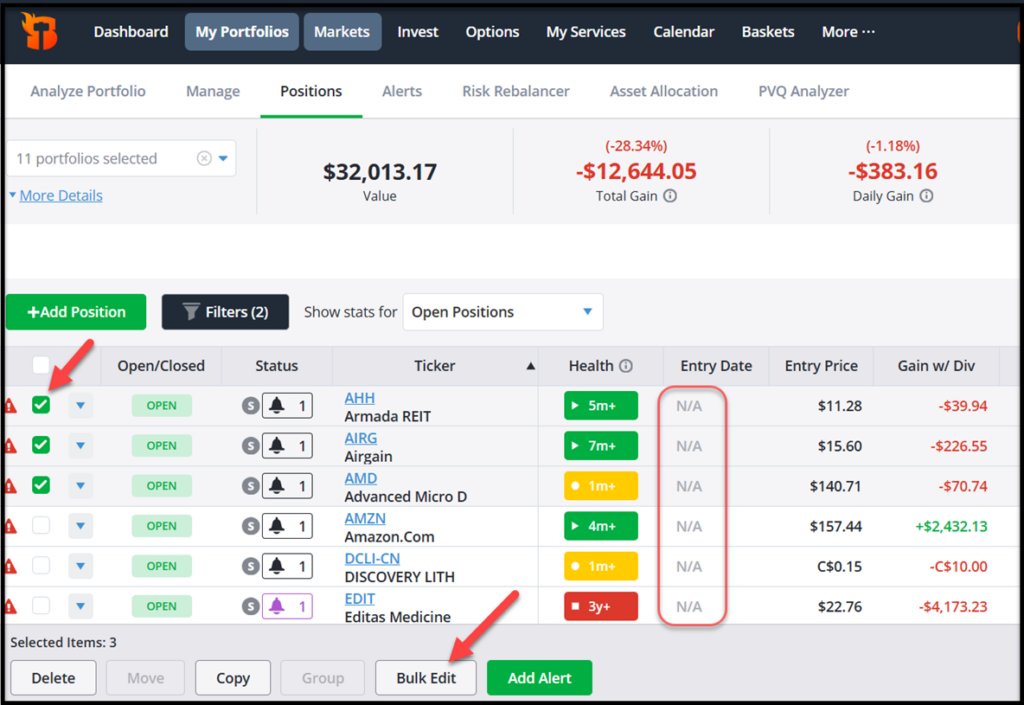
Entry dates and prices for some assets may not always transfer on the initial import of your account details. That’s because we only receive the most recent transaction history from your broker when syncing via Yodlee FastLink.
But there’s an easy fix: you can add this information yourself. To add entry dates and prices manually, select the positions in your portfolio by using the checkboxes on the far left of your screen, and use the “Bulk Edit” option. This will allow you to quickly enter your entry dates and entry prices:
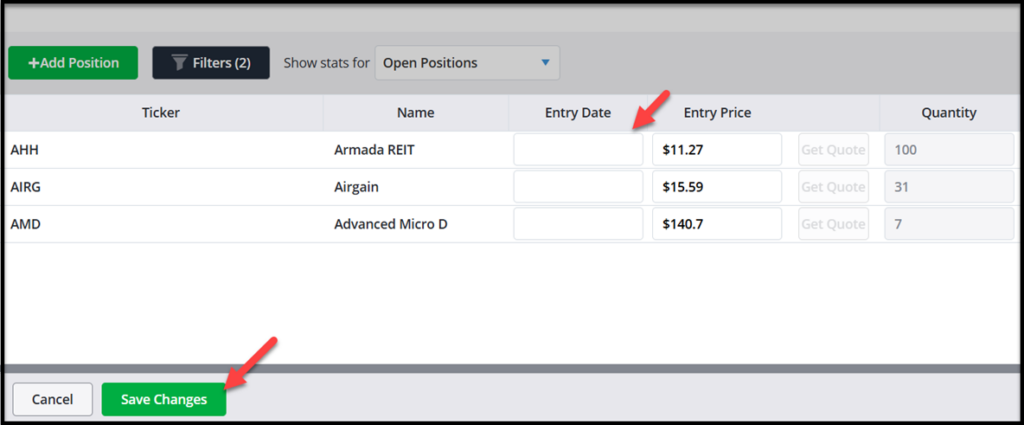
If we receive your purchase transaction correctly, newly purchased positions imported during our daily updates should successfully pull over the entry date.
Simple Data Edits for Options Positions
Sometimes, options data can get mixed up in the process of syncing your account with TradeSmith Finance. Details includingthe expiration month, strike price, and whether the contract is a call or put can be missing for synchronized options positions.
That’s because brokers format options data differently.
If we do not get compatible information from your broker, your option will appear with just the underlying stock symbol in the option symbol field. But there’s an easy workaround.
By simply clicking the symbol, you will be able to manually enter any missing data to save your full option symbol correctly…

Mike Burnick’s Bottom Line: Because time really is money, you can save plenty of your valuable time by automatically syncing your brokerage account with TradeSmith Finance. This process allows you to easily keep up to date on all your holdings – all in one place.
You can set interactive alerts and protective stops on all your investments to be notified just as soon as anything changes. Plus, make full use of other TradeSmith tools for easy and automatic rebalancing of your portfolio to reduce risk and find new investment opportunities to enhance your profit potential.
Good investing, and Happy Holidays!
Mike Burnick
Senior Analyst, TradeSmith
P.S. Synchronizing your brokerage data with TradeSmith Finance can help you save time, but there’s more than one way to get synchronized when it comes to managing your investments. And there’s one method you won’t want to miss out on – for time or money.
TradeSmith’s CEO Keith Kaplan has been leading our team of researchers and developers in an effort to develop an incredibly powerful tool: a system that can identify the seasonal rhythms and cyclical movements of stocks across the market… a system that can identify the start of a seasonally bullish period down to the day – with the potential to deliver powerful results for a portfolio synced up with these periods.
And they’ve cracked it – in a development Keith believes is revolutionary for TradeSmith and the investment world as a whole. He’s developed a new trading strategy built around this system – and the rest of the powerful algorithms behind our Trade Cycles service.
When tested, this strategy could have delivered 857% in growth over 18 years – more than twice what the S&P delivered over the same period. And Keith is putting it in your hands, as part of TradeSmith’s goal to empower individual investors.
Keith will be holding a webinar to introduce and explain in detail his breakthrough strategy and walk you through the latest version of the Trade Cycles Seasonality tool. And you won’t want to wait for it: As part of his effort to spread the word, Keith is giving you access to the Seasonality tool to try it for yourself.