

What if deciding when to buy and sell stocks was as easy as opening your desktop calendar and circling a few dates each month?
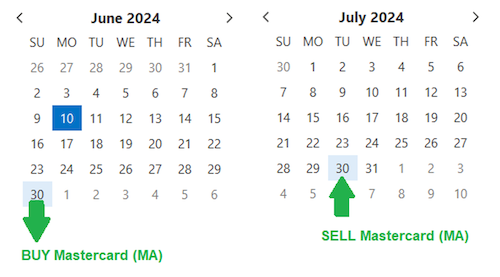
Well, thanks to our expert software developers here at TradeSmith, it is just that easy to spot opportunities year-round with our Trade Cycles Calendar. In fact, there’s one coming up soon with Mastercard (MA), as we’ll discuss in a bit.
And if you’re not using this valuable tool yet, I’ll show you how to set yourself up for consistent profits – and greatly improve your trade timing every month. Let’s dive right in.
Note, you need a subscription to Trade Cycles by TradeSmith, TradeSmith Essentials, or TradeSmith Platinum to access the calendar. If you don’t see this option in your TradeSmith Finance dashboard — and would like to — call 888-623-0858 to discuss.
To use the Trade Cycles Calendar, simply log in to your TradeSmith Finance platform and click on Calendar from the top main menu. This should bring you to the Market Calendar page, which looks like this.
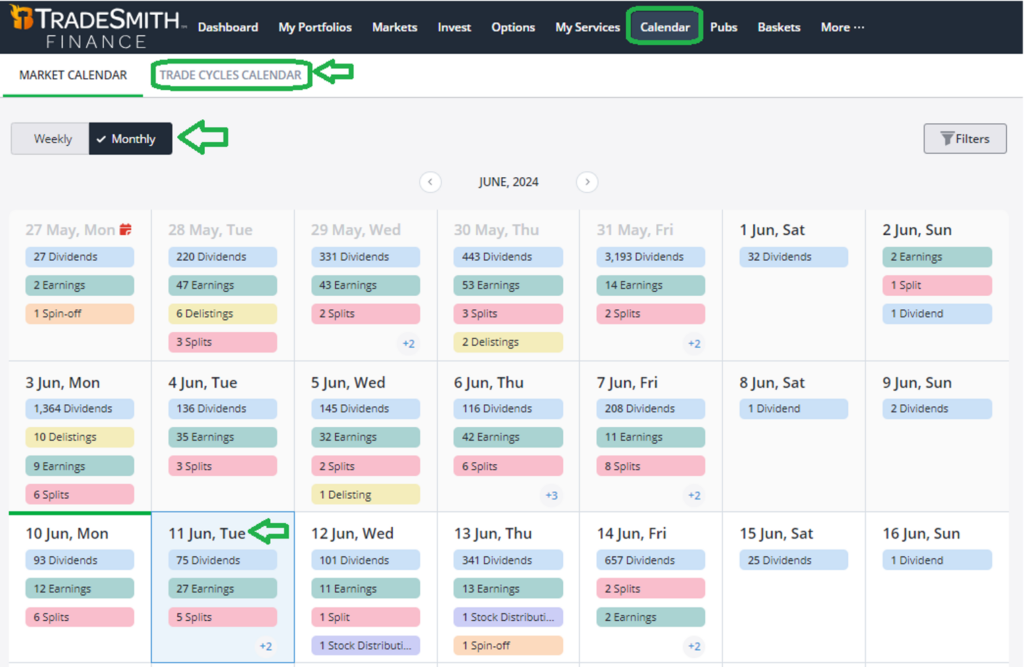
Here you can switch between a Weekly or Monthly view of upcoming dividends, earnings reports, stock splits, and other corporate actions for thousands of stocks we track, as we’ve explored previously here in Inside TradeSmith.
Each event is color-coded by type. For instance, you can see that today, Tuesday, June 11, there are 75 dividend actions, 27 earnings announcements, and five stock splits taking place, along with some other actions.
Next to Market Calendar, you’ll see the Trade Cycles Calendar tab. When you click here, you’ll see a calendar view of upcoming cycle peaks and valleys for a list of stocks.
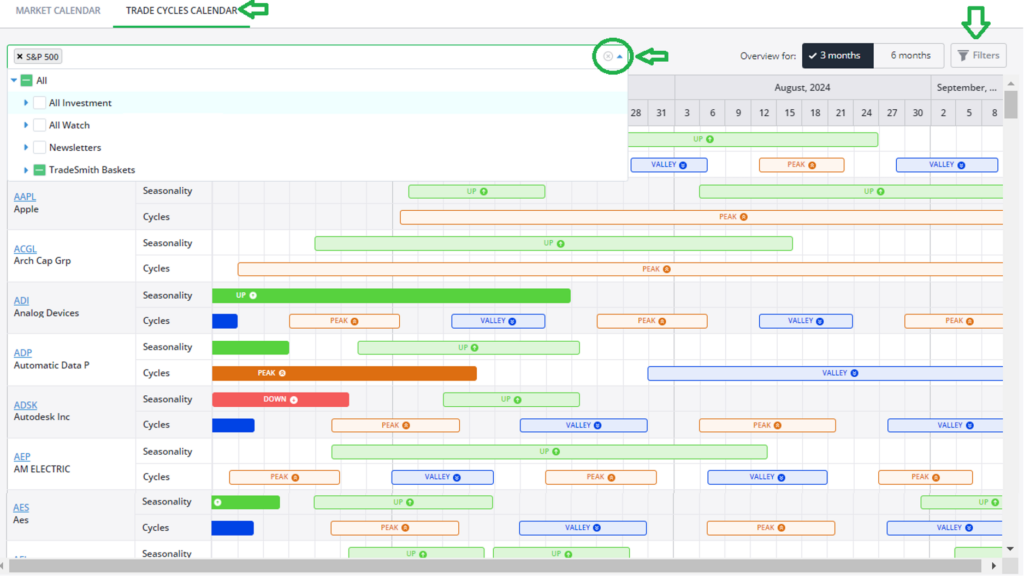
For each ticker, you’ll see two rows of information. Look across the Seasonality indicator line to find the next Up or Down patterns, and the Cycles line for upcoming Peak and Valley turn areas.
If you’ve used Trade Cycles before, you’ll know that this tool spots trends based on longstanding price patterns within the stock, almost like how the moon affects the ocean tides in a predictable cycle. On top of these natural ebbs and flows, there are seasonal patterns like how strong the currents will be at specific times of year.
Similarly, when price cycles and seasonality align within a single stock, they can have a powerful impact… that you can turn to your advantage.
Here’s how to navigate the Trade Cycles Calendar – and the potential up-and-down moves that could be right around the corner.
Use the dropdown box near the top of the screen to open any saved investment portfolios or watch lists you use, along with newsletter portfolio lists or TradeSmith baskets. I chose the S&P 500 Basket.
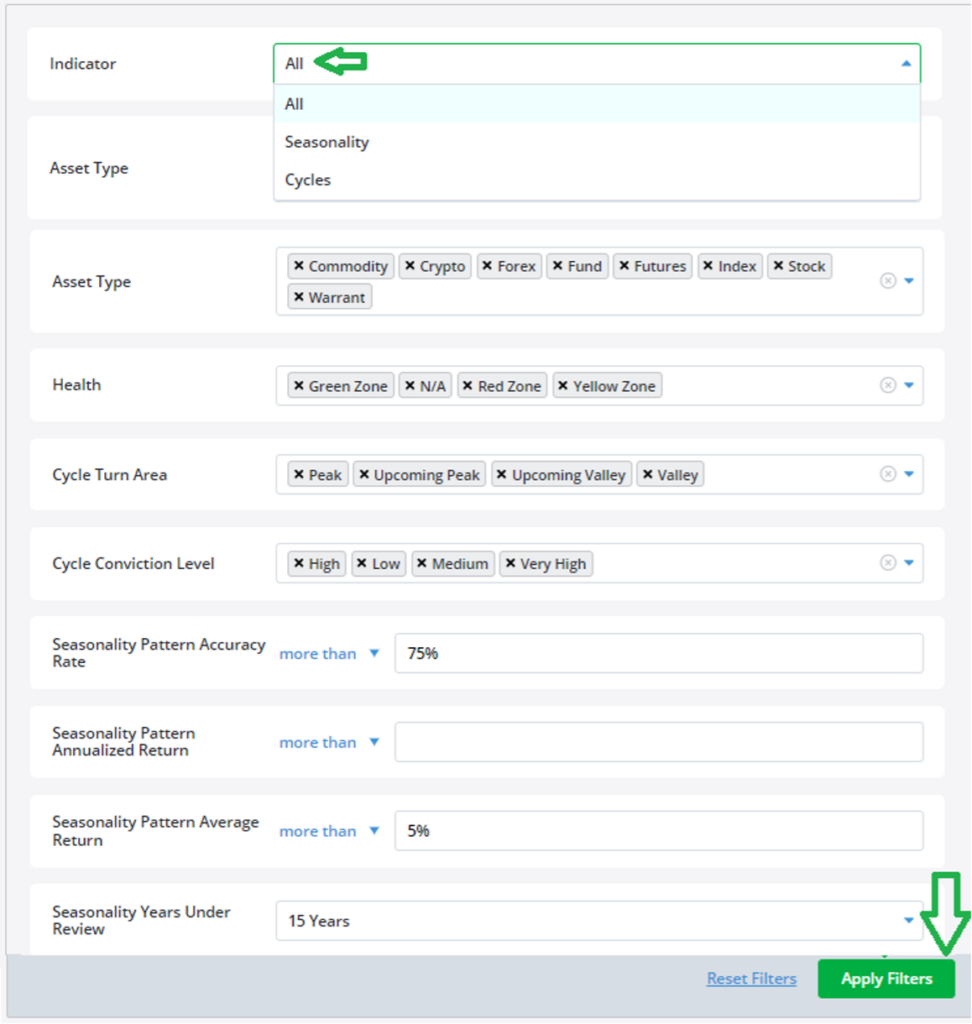
Next, click on the Filters button at the top right to open and select filter options and customize your Trade Cycles Calendar view, as shown below.
Starting at the top:
- Indicator: You can choose either traditional Cycles or Seasonality windows. Click on All to combine both in the same calendar view.
- Asset Type: Choose from a wide variety including stocks, futures, and commodities.
- Health: Next you can choose from the Health Indicators of Green, Yellow, Red, or a combination.
- Cycle Turn Area: Choose from Peak, Upcoming Peak, Upcoming Valley, or Valley.
- Cycle Conviction Level: Here you’ll zero in on High, Low, Medium, or Very High.
- Seasonality Pattern Accuracy Rate: Choose any percentage you desire, from zero to 100%. I used more than 75%.
- Seasonality Pattern Average Return: Again you can choose your desired level of potential profit. I selected more than 5% (per trade).
- Seasonality Years Under Review: I choose 15 years.
- You can get even more specific by selecting the Seasonality Pattern Annualized Return (%) and the Days to Seasonality Pattern Start Date.
Once you’ve made all your filter selections, simply click on Apply Filters at the bottom right to view your results.
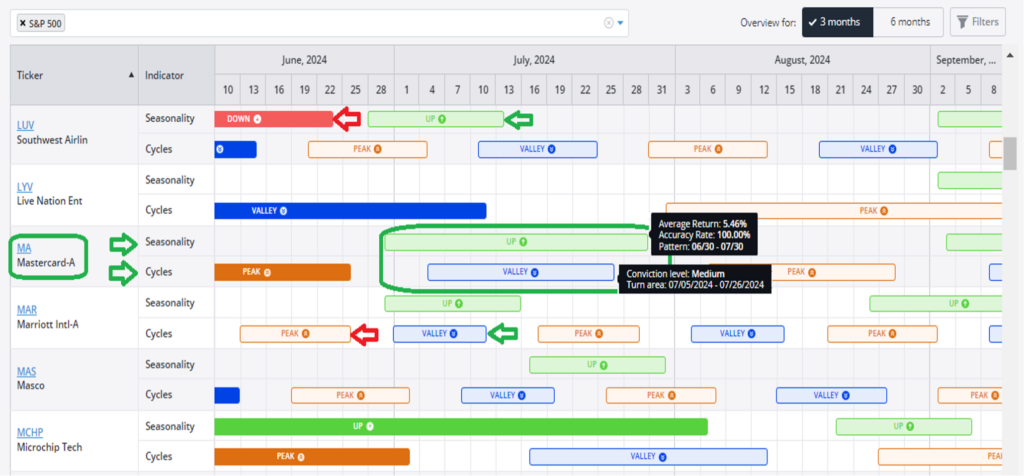
Our system displays a handy calendar view with the most recent date at left. You can choose from either a 3- or 6-month view, and I show three months above.
For my money, I like to scroll through the list to find those instances where a Valley turn area aligns with an Up pattern. That’s the case with credit card processing giant Mastercard (MA), highlighted above with a green oval.
When you hover your cursor over the cycle or seasonal pattern, a black dialog box pops up with more details. For MA we can see an overlap with the seasonal uptrend window and a valley turn area.
✓ The seasonal Up window is open from June 30 to July 30, with a pattern accuracy rate of 100% over the last 15 years, and a 5.46% average return per trade.
✓ At the same time, the Valley area runs from July 5 to July 26 at a medium conviction level.
✓ Taken together, these two powerful TradeSmith timing indicators tell me that MA just might be a great short-term trading candidate over the next month or so.
For even more details on any seasonal window or timing cycle, simply pull up the ticker symbol in TradeSmith Finance and click on the Trade Cycles tab.
You’ll find every significant seasonal window that occurs throughout the year and detailed stats on the accuracy rates and returns. Plus, we give you a complete year-by-year summary of each seasonal window, including the start and end dates, prices, returns, and the maximum gain and maximum drop during each window going back 15 years, or whatever review period you choose.
Mike Burnick’s Bottom Line: Spotting seasonal bullish and bearish windows together with timing cycles just got a whole lot easier thanks to our Trade Cycles Calendar. You can review any portfolio, watchlist, or basket of securities and in just a few minutes find bullish and bearish trading windows to potentially cash in on.
Good investing,
Mike Burnick
Senior Analyst, TradeSmith