Build Your Own “Magnificent” Portfolio With TradeSmith Pure Quant
Note from Ashley Cassell, Managing Editor, TradeSmith Daily: Normally today we’d be bringing you a digest of market moves and TradeSmith insights… But we’re taking a detour for the happiest of reasons: Michael Salvatore is on leave due to the birth of his first child. So, Mike Burnick will be filling in for the next few Fridays.
Read on for an actionable model portfolio Mike built in our Pure Quant tool. Not only that, he shows you exactly how Pure Quant works, which will be a peek behind the curtain for those of you who have enjoyed previous portfolio suggestions shared by Michael and by Keith Kaplan here in TradeSmith Daily. Enjoy, and be sure to leave your well wishes for the new parents at [email protected]. This article also appeared last night in Inside TradeSmith.
After years of devotion, investors may be losing faith in the “Magnificent 7.”
… Or should I say the “Not-So-Magnificent 7,” given their recent performance?
This group of high-growth, mega-cap tech stocks drove the lion’s share of stock market performance in 2023 and 2024. The Mag 7 stocks alone accounted for 63% of the S&P 500 Index’s total gains in 2023 – and another 55% of the upside in 2024:
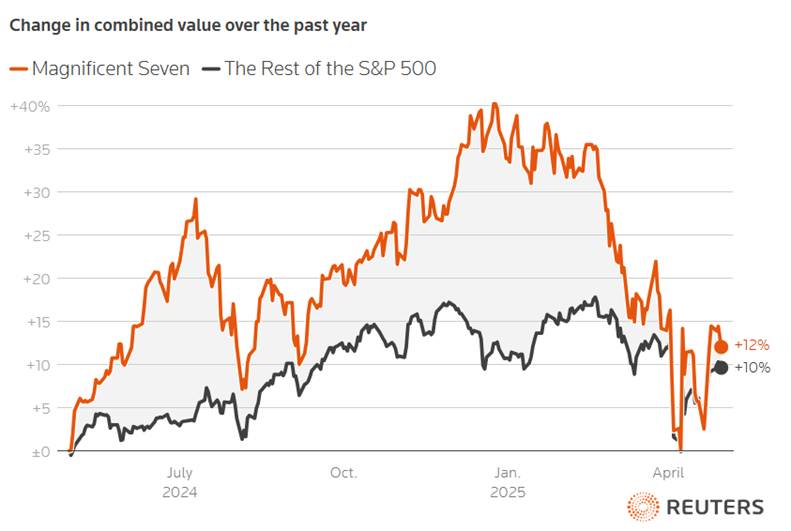
But along with higher share prices came nosebleed valuations. It was just a matter of time before something came along to burst their bubble.
And that something was tariff trauma.
The Mag 7 stocks had been underperforming since the start of the year due to growing doubts about the sustainability of their sky-high valuations.
This year’s tariff trauma simply added insult to the injury – and brought these market superstars back toward earth:
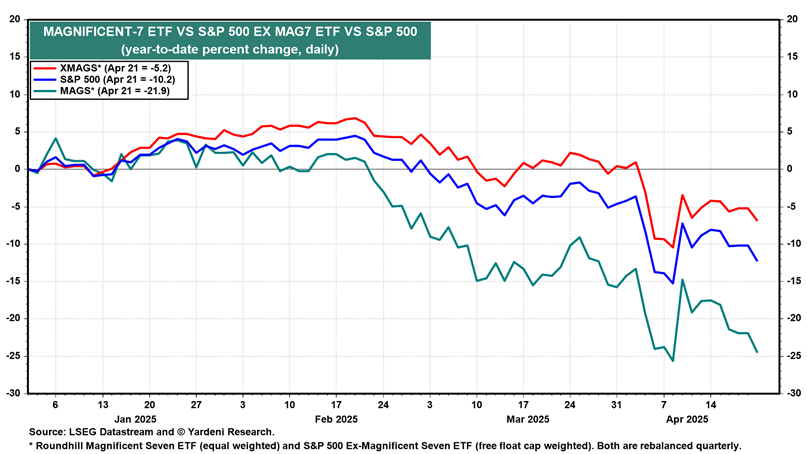
So far this year, as you can see above, the Mag 7 stocks have dramatically underperformed compared to the S&P 500 and performed even worse relative to the average stock in the index.
Here are the year-to-date results through April 21:
- Mag 7: -22%
- S&P 500 Index: -10%
- S&P 500 excluding the Mag 7: -5%
This group of former stock market darlings has fallen out of favor, though the overall market’s response to yesterday’s headline earnings reports from Meta Platforms (META) and Microsoft (MSFT) has been positive. Whether that post-earnings positivity sticks is yet to be seen.
But that doesn’t mean you can’t find good opportunities in today’s less expensive stock market.
In fact, you can use TradeSmith analytics to build your own personal Magnificent 7 stock portfolio, according to our own magnificent array of objective analytics tools and data.
Here’s how to do it…
Build Your Own Magnificent Portfolio With Pure Quant
Whether you just want to own seven stocks, 70 stocks, or somewhere in between, our exclusive Pure Quant Portfolio Builder tools can help you create a fully optimized and balanced portfolio from scratch. And if you don’t see Pure Quant on your dashboard – and would like to – please call our Customer Care team at 866-220-1107 to find out more.
After logging in to TradeSmith Finance, you would access Pure Quant by opening the Invest page from the top of your screen, then by selecting the Pure Quanttab:
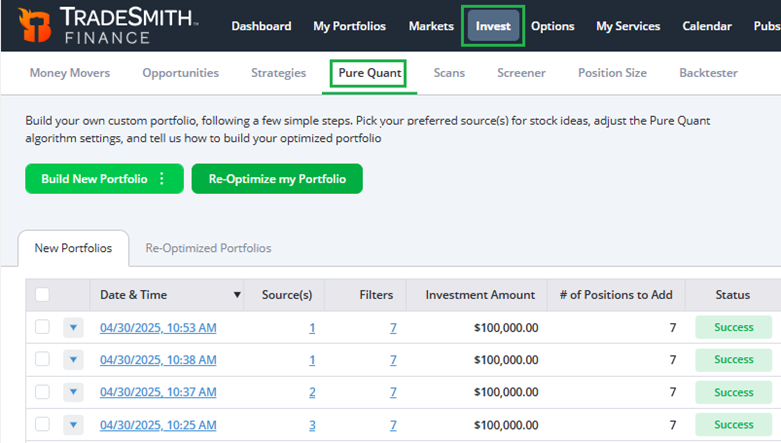
When you open the Pure Quant tab, you’ll be presented with any portfolios you have built or Re-Optimized with our system in the past – which you can select from the list shown above.
You click the blue triangle to the left of any portfolio to edit or delete that portfolio, or click the square checkboxes to select and delete multiple portfolios at once.
Or, simply click the Build New Portfolio button to create a model portfolio or start a new one from scratch.
Alternatively, you can select the Re-Optimize my Portfolio button to run Pure Quant on any of your previously saved TradeSmith Finance portfolios.
Now, let me walk you through the easy process of building a new Pure Quant Portfolio from scratch – in just four simple steps.
Step #1: Choose Your Sources
After clicking the Build New Portfolio button and selecting Build Portfolio from scratch, you’ll be presented with your first step in our Pure Quant process. To get started, you’ll need to choose your sources – the places our TradeSmith analytics software will pull asset data from.
Your sources could include a list of recommendations from your favorite newsletters, specific stock market indexes or sectors, TradeSmith Baskets, or – my personal favorite! – a saved TradeSmith Screener:

Working your way down the page shown above, you will see options for sources you can use – and a toggle option to determine how those sources are combined.
There are two options you can choose from by clicking the Sources Combination button:
- Any: Your portfolio will be built using positions from any of your selected sources.
- All: Your portfolio will be built using only positions that match all of your selected sources.
Next, use the drop-down menus further down the page to select your Pure Quant portfolio’s sources. There are plenty to choose from:
- The Billionaire’s Club is a select group of billionaires we track, including Warren Buffett, Bill Ackman, and more. This filter will find stocks owned by one or more of these billionaire investors.
- Newsletters allow you to filter for stocks in the portfolios of any newsletters you subscribe to.
- TradeSmith Baskets contain our curated baskets of stocks, and your own user-defined baskets.
- You can also select from various Markets, including the main benchmark indexes; the 11 major market Sectors; and you can also choose the Country of Exchange. We support Australia, Canada, the United Kingdom, and the United States.
- Individual Securities lets you add specific ticker symbols you’d like to include.
- Portfolios & Watchlists let you choose from portfolios or watchlists you’ve already created.
- ETFs & Mutual Funds allow you to include ETFs and mutual funds in your new portfolio.
- Saved Invest Screener is what I use most often: You can choose from any of your saved stock screeners – or select any combinations of screeners you’d like to use.
Here, I chose a screener I use all the time, my Quality, Hi Free Cash Flow, Seasonality Screener.
I don’t want to digress too much from the Pure Quant Portfolio Builder, but this screener combines our Business Quality Score (BQS) with the key metric of Free Cash Flow Yield (FCF) – along with our powerful Seasonality tools, which can help you pinpoint exactly when a stock may be about to surge higher.
I’ve written many Inside TradeSmith columns on how to build and use winning screeners like this one, which you could follow in advance of using Pure Quant. For all the info about this particular screener, here’s a recent column that gives you a deep dive into the latest upgrades to our Screener tool – along with details on our exclusive BQS and FCF yield indicators that I used here.
Now, let’s get back to building our portfolio.
Once you’ve set up your source selections, click the gray Change default settings button – and let’s move on to step 2.
Step #2: Change Your Settings
From this menu, you can set up your default settings for your Pure Quant portfolio based on several TradeSmith metrics. Here are my preferred selections below:
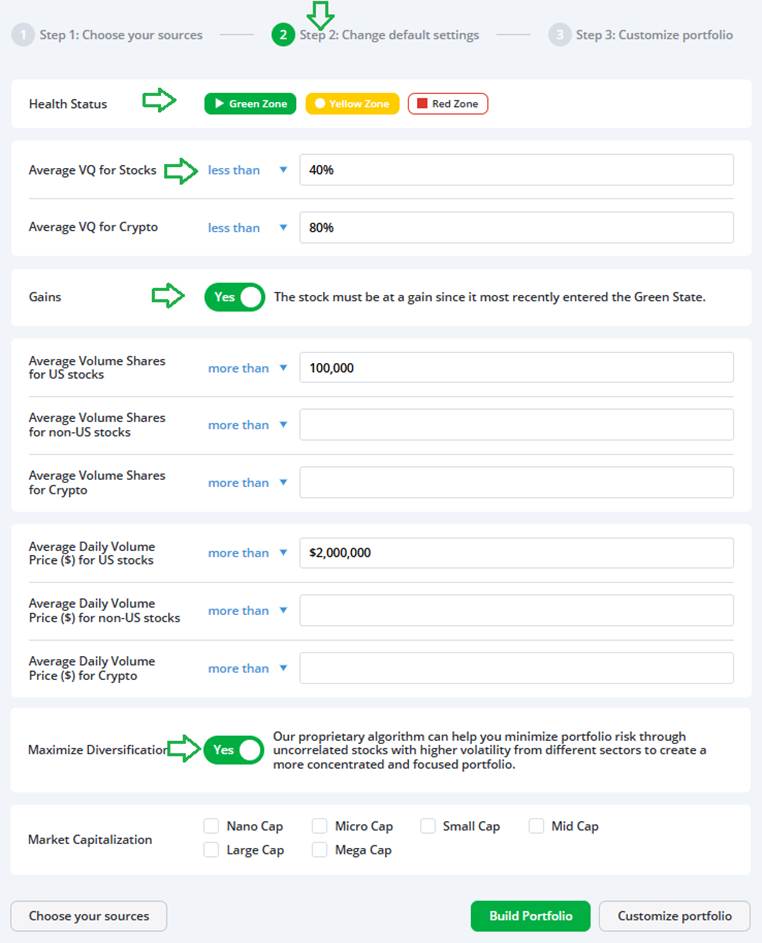
Going down the page, I’ve chosen to limit my portfolio to only those stocks in the TradeSmith Health Indicator Green or Yellow Zone, and the Average VQ for those stocks must be less than 40% – that’s average to below average risk. If you’re including crypto, I would recommend setting the Average VQ to be less than 80%.
Next, I also click the toggle to select only stocks that are at a gain since entering the Green Zone. And as for liquidity, I selected only U.S. stocks that trade at least 100,000 shares per day and have an average daily volume of more than $2 million in transactions.
When it comes to the Maximize Diversification toggle, I always click on Yes. That way our TradeSmith algorithms can help you minimize risk with stocks and other assets that are not highly correlated.
In other words, when some assets zig, others zag – giving your overall portfolio a smoother ride through volatility or sector-specific downturns.
Finally, the Market Capitalization checkboxes let you choose any size stock – from nano-cap small stocks to mega-caps like the Mag 7. Leaving these boxes unchecked allows the Portfolio Builder to select stocks of any size.
You can change any of these defaults simply by clicking on the blue less than or more than icons. Anywhere you see blue text and a triangle, you can click to change your parameters.
Now, let’s click the gray Customize portfolio button to move on to the last and easiest step… which is where the real fun begins.
Step #3: Customize Your Portfolio
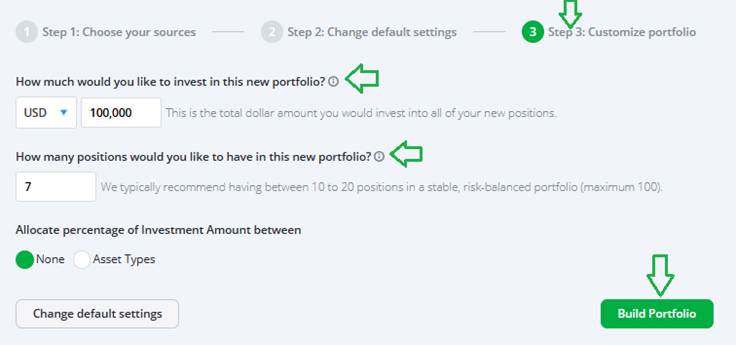
On this final menu screen, simply choose how much you’d like to invest in your new portfolio, and how many positions you’d like to have.
You can use the drop-down menu to select a different currency if desired, and the two text boxes can be used to edit how much you’d like to invest and the number of positions you want to own.
For simplicity’s sake, I chose $100,000 and seven, respectively, to build my own personal Mag 7 portfolio.
And for multi-asset portfolios, you can also click on Asset Types to select your own personal asset allocations from the menu that appears:
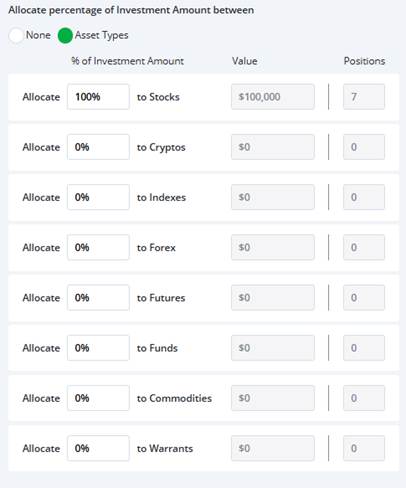
In this Portfolio Builder example, however, I’ll keep it simple and just stick with stocks.
Step #4: Get Your Results
Finally, we’re ready to rumble. Now that we’ve finished customizing, click on the green Build Portfolio button to run your Pure Quant scan and see what you get.
Here are my results based on the settings we plugged in:

And there you have it – an optimized “Magnificent 7” portfolio of my own, spread across six different sectors for excellent diversification.
The first seven stocks listed in the results above are recommendations from our Pure Quant algorithm. It aims to provide the best combination of stocks from the thousands we track.
Notice that the Portfolio Volatility Quotient (PVQ) of 20.06% is less than the individual Volatility Quotients (VQ%) of all seven selected stocks. That’s the power of diversification among non-correlated stocks working in your favor.
But if you don’t like some of the stocks selected, Portfolio Builder provides you with several alternatives (the grayed-out stocks), which you can easily select instead of the top results to customize your own portfolio.
You can add your selected stocks to a Basket or Portfolio to keep close track of these positions moving forward, without needing to return to the Pure Quant menu.
And if you sync your investment accounts with TradeSmith Finance, which is super easy to do, you can set protective stops, alerts, and more. Plus, you can set TradeSmith Finance to send automatic updates about changes to your portfolio holdings.
Mike Burnick’s Bottom Line: TradeSmith’s Pure Quant and Portfolio Builder tools can give you a powerful edge when building a diversified investment portfolio, no matter the market environment… And our tools make it easy to re-optimize your portfolio holdings regularly to stay in sync with constantly changing market conditions.
If you aren’t already taking full advantage of Pure Quant in your TradeSmith account, simply contact our Customer Care team at 866-220-1107 to find out how to get started.
Good investing,

Mike Burnick
Senior Analyst, TradeSmith
P.S. TradeSmith’s Pure Quant tools can help you build your own superstar portfolio – to keep you profitable and well-positioned even as tariff trauma and earnings results send volatility higher across the market.
But as important as it is to take defensive positions, it’s just as important to recognize the changes occurring in the market: Earnings estimates are being cut. Market leadership is in flux. And investor sentiment feels more and more fragile by the day.
And while recent earnings results from META and MSFT bolstered the market on Thursday, there are still plenty of warning signs flashing… signaling bigger changes ahead.
With all the uncertainty unfolding across markets right now – from falling EPS estimates to rising concerns over trade policy – investors need to be more vigilant than ever.
That’s why Luke Lango, my colleague over at InvestorPlace, just presented a special online briefing last night called The 2025 Summer Panic Summit.
Luke was named the #1 stock picker of 2020 by TipRanks, outperforming more than 15,000 analysts and Wall Street veterans – so he’s incredibly familiar with unpredictable market conditions. And right now, he’s issuing what may be the biggest warning of his career. He believes a $7 trillion shock could hit the market as early as next Wednesday, May 7… driven by a major new policy move.
In his free briefing, Luke presents a new class of AI-driven companies he believes could lead the next wave of market moves – and walks you through the details of the coming shock.
Luke’s live presentation is over, but there’s still a chance to catch the replay. Click here now to watch his Summer Panic video.
You won’t want to miss it.