Prepare For High Volatility With A Portfolio Sync!
Buckle up, folks – because we might be hitting some major market turbulence!
Over the last few weeks, we’ve highlighted the strong bearish seasonality that stocks experience in September and October. And as I mentioned last week, we’re now in the statistically worst period of the year for the S&P 500 (SPX).
That’s because, historically speaking, the worst of the September seasonal declines tend to begin right around the middle of the month… and we’re now exactly halfway through September.
So far, the S&P 500 is down about 2% from the monthly high seen on Sept. 3. The market’s “fear gauge,” the CBOE Volatility Index (VIX), has jumped nearly 8% in just the last week.
That’s enough to put investors on edge already. But on top of that, the Federal Reserve is due to announce the results of its latest policy meeting tomorrow afternoon.
The latest numbers from the CME FedWatch tool suggest that Wall Street overwhelmingly expects the Fed to raise interest rates by 25 basis points. But if the Fed decides to make a more dramatic hike – perhaps in response to the recent spike in diesel prices – then all bets are off.
We’ll have to wait until tomorrow to see how the rate decisions shake out. That uncertainty can be uncomfortable… and it’s clear that Wall Street is on pins and needles waiting for the decision as well.
That said, we can do more than just sit on our hands and wait: one easy way to reduce your stress level amid market uncertainty – and keep close watch on your investments at the same time – is by taking a moment to check in with TradeSmith’s Portfolio Syncing Tool.
Get in Sync with Shifting Markets
By syncing your portfolio, you can easily track all of your investments from the comfort of your TradeSmith Finance platform.
That way, you’ll spend less time worrying about the markets and have more time to use our proven tools and strategies to find new opportunities.
Whether you’re a long-term investor or a more active trader, syncing your investment accounts with our user-friendly My Portfolios page on TradeSmith Finance is a quick and easy way to take more control over your finances – with just a few clicks!
Once synced, you can use our TradeSmith tools to:
- Monitor the risks and potential rewards of every asset you own…
- Track performance compared to benchmarks like the S&P 500 or Nasdaq…
- Create personalized alerts to notify you of price changes…
- Rebalance your portfolio, so you don’t take unneeded risks…
- And set protective stops on your investments to help guard against drawdowns.
It’s super easy to get in sync. Here’s how.
How to Add and Sync Your Portfolio – Quickly and Safely
While you always have the option to manually input your investment details, the fastest – and by far the easiest – way to set up your portfolios is by using our automatic syncing feature.
To sync your brokerage account, simply log into your TradeSmith Finance account to get started.
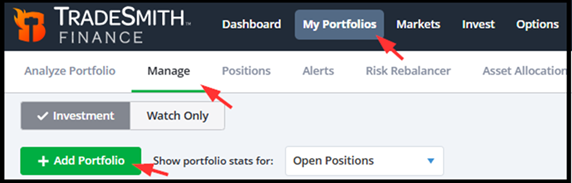
Next, go to the My Portfolios page. From there, select the Manage tab, and then click the green Add Portfolio button to start the syncing process.
While you always have the option to manually input your investment details, the fastest – and by far the easiest – way to set up your portfolios is by using our automatic syncing feature.
To sync your brokerage account, simply log into your TradeSmith Finance account to get started.
Next, go to the My Portfolios page. From there, select the Manage tab, and then click the green Add Portfolio button to start the syncing process.
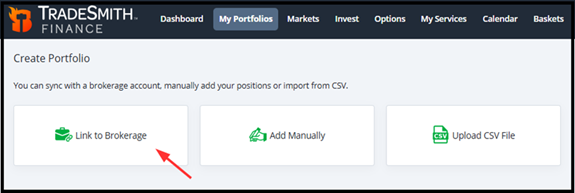
Next, select the Link to Brokerage option. Then click Continue to choose your broker. It’s that easy!
Our portfolio syncing features are handled through Yodlee FastLink – a secure-channel connection service trusted by major banks and brokerage firms.
While we use this service to pull data from your broker account and sync it securely with your TradeSmith Finance platform, there’s no need to worry about your security. None of your personal account credentials will be saved to our servers.
Next, simply select your broker from our list – which features some of the most popular and well-known firms.
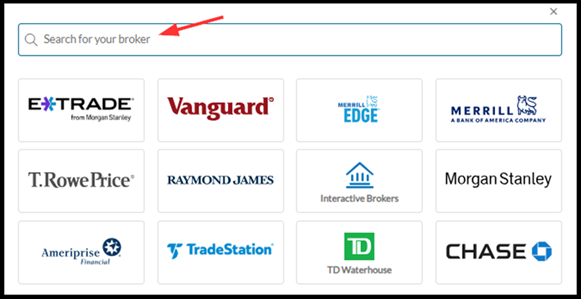
And if you don’t see an icon for your broker, you can always search for your broker on this page by typing your broker’s name into the search bar at the top of the list.
If you can’t find your broker, simply contact our customer support team at [email protected]and we may be able to assist.
After selecting your broker, simply follow the prompts to complete your portfolio sync with your TradeSmith account.
If you’re new to TradeSmith, or just haven’t synced up your portfolio yet, you’ll find more details here. This includes a simple step-by-step process to help ensure all your data is accurately synched.
Once in sync, you can click on the My Portfolios tab anytime to assess your investment performance in real time on the Overview tab:
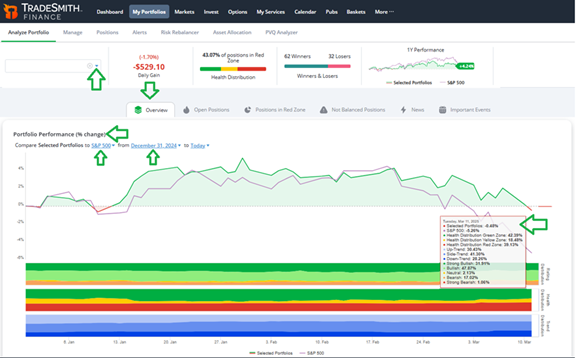
Here you can see at a glance how your investments are tracking vs. the S&P 500.
Plus, scroll down and you can view your portfolio allocation according to our key TradeSmith metrics…
- Health distributions for every position (Green, Yellow, and Red Zone statuses), on both the Short- and Long-Term timeframes,
- Rating distributions of your holdings (ranging from Strong Bullish to Strong Bearish),
- Sector and Industry Allocation,
- And above all, your portfolio Risk Allocation:
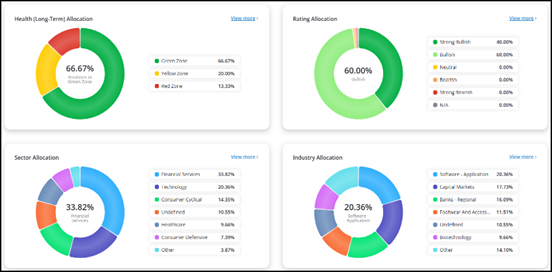
Simply click on the blue View more > option on each window for a more detailed breakdown of your investments.
Next, click on the Open Positions tab to the left of Overview:
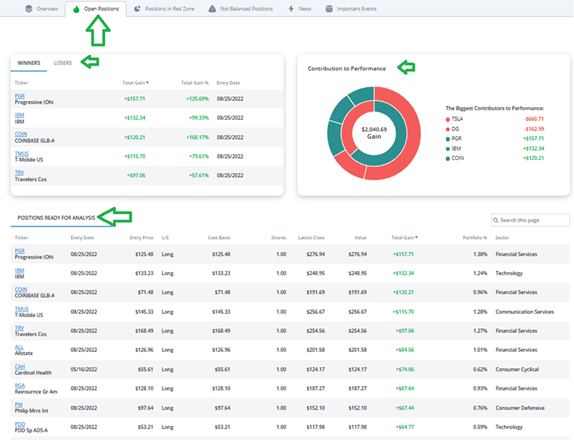
Here you can quickly assess the top winners (and losers) in your portfolio, plus see the biggest contributors to (or detractors from) your performance.
This information can help you easily rebalance your portfolio by trimming underperforming stocks and adding new opportunities with greater upside potential.
Bottom Line: With seasonal volatility on the rise, you’ll want to keep close watch over your investments with TradeSmith’s portfolio syncing tool. It’s the less-stress way to trade and invest, here to help you avoid unnecessary risk.
Good investing,
Mike Burnick
Senior Analyst, TradeSmith
P.S. TradeSmith’s portfolio syncing tools can help you monitor changes in your portfolios, no matter how the market moves. When markets are volatile, making sure that your investments are in sync with TradeSmith Finance is a great defensive measure – but that doesn’t mean you should ignore new trading opportunities.
My colleague Jeff Clark, Senior Analyst of Delta Report, has traded options for a living across his entire career – and he’s been in the business longer than I have! Over his decades of experience, Jeff has developed a knack for identifying periods of major market opportunity… and he believes today’s volatility is the perfect setup for one of his favorite options trading strategies.
It’s the idea behind Jeff’s 12 Trades to $1 Million Challenge, an ambitious plan to help his readers try and turn a $5,000 stake into $1 million or more in just 12 trades.
Jeff started this Challenge earlier this year, and the early results speak for themselves: three winners already, with gains of 166%, 153%, and 91%.
Now, as volatility spikes again, Jeff has re-opened the doors: he’s inviting investors to join him and his readers as they continue the Challenge – and show that it’s time for options to shine.
But if you’re interested, you’ll need to act fast: Jeff could drop his next trade recommendation at any moment, and his offer closes at midnight tonight, on Tuesday, Sept. 15.
Click here to see how you can still get in – and take full advantage of today’s volatility.