Your First “Lesson” in TradeSmith: When to Buy, Sell, or Hold
Investing and trading just isn’t what it used to be.
In today’s high-tech world, financial markets move much faster… are more volatile… but potentially much more lucrative than ever before.
See, when TradeSmith launched in 2005, it was a team of just a handful of people and our only product was an interactive spreadsheet.
From those very humble beginnings, we’ve grown to more than 100 employees and contractors around the world, including over 69 computer engineers and programmers.
We have PhDs, Chartered Market Technicians, Chartered Financial Analysts, MBAs, AI experts, former hedge fund managers, and more on staff.
And we are at the forefront of incorporating AI, pattern recognition, and machine learning into user-friendly tools that over 150,000 people trust to track over $30 billion of their wealth…
It’s true – trading now is nothing like it was when I got into the business in the early 1990s.
And that’s a great thing.
But I know as well as anyone here that what we have to offer at TradeSmith is amazing… but it can also be hard to know where to start.
TradeStops, Trade360, Options360, Predictive Alpha Options, Alpha Signals… it can all muddy together.
And the truth is, there’s no one-size-fits-all answer. What works for your coworker might not be your beat.
But the bottom line is, no matter which type of investor or trader you are, TradeSmith tools can give you an edge, just like the quant funds.
Our proven analytics and strategies can help you make better informed decisions and be more successful.
So, consider today’s column the start of a multi-part series I’ll nickname “TradeSmith 101.”
Over the next few weeks, I’ll guide you through everything we offer – and how to take advantage of it, no matter your skill level.
Now, Warren Buffett once said there are two rules for investing…
- Rule #1 is don’t lose money.
- Rule #2 is… don’t forget Rule #1!
That’s why we’re kicking off this series with TradeStops. It’s all about helping you follow Buffett’s wise investing rules.
Lesson 1: Master TradeStops the Buffett Way
TradeStops is our trademark risk-avoidance tool – and our first stop on this TradeSmith tour.
- Who TradeStops is for: Long-term investors, short-term traders, and everyone in between.
- Standout feature: A unique Green-Yellow-Red coding system that tells you whether an asset is a Buy, Hold, or Sell – works for both long- and short-term!
- Why we love it: One of the biggest trip-ups in investing is reactivity. If you react to every bit of bad news, you might sell your shares in a stock that’s only in a crummy lull – and miss out on future price pops. TradeStops evaluates a stock over a period of months (long-term) and weeks (short-term) to determine the normalcy – and true direction – of its activity.
It’s based on our unique risk metric, the Volatility Quotient (VQ), which provides you with a customized trailing stop that’s unique to the volatility profile of every security.
TradeStops helps you avoid one of the biggest pitfalls of investing or trading: timing.
Knowing when you should buy, sell, or hold takes a lot of the guesswork out of managing your investments by reducing risk.
TradeStops also features our exclusive Health Indicator shown below.
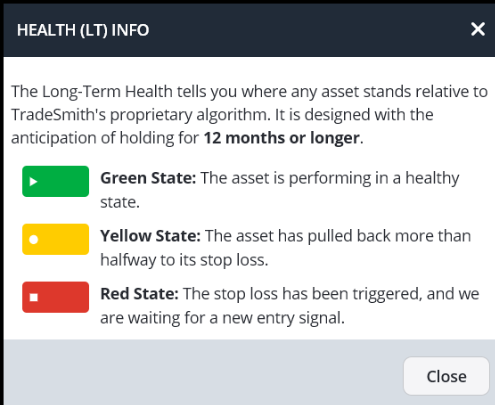
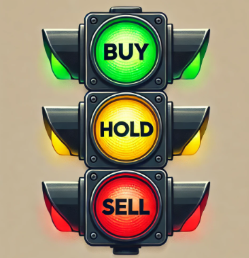
At a glance, this indicator provides insight into the Health of any security you own or are considering with an easy-to-follow Buy (Green), Sell (Red), Hold (Yellow) system.
These indicators are graphically displayed for each security on our TradeSmith platform, as shown below in this chart for Apple (AAPL).
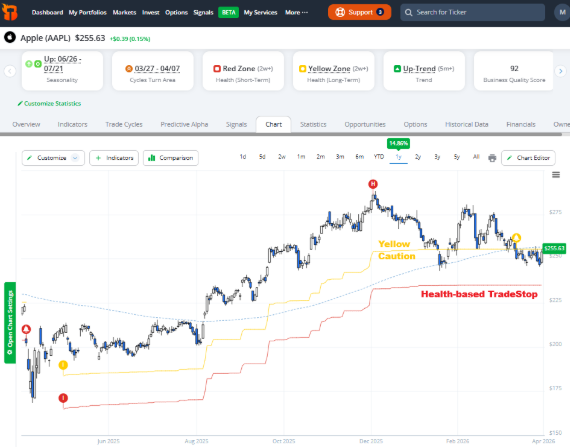
You can see that AAPL is in the Health Yellow Zone (caution). The stop-loss level based on Health is clearly marked by the red line at $235. No guesswork involved.
There’s a wealth of additional data available on this page, as well as the stock’s Overview and Indicators tabs.
Instead of relying on your emotions or someone else’s half-baked opinion, you can rely on our objective data to instantly evaluate the health of any security.
And our Health Indicator actually provides you with two valuable metrics in one.
Long-Term (LT) Health tracks the historical trend and volatility for every security over a longer time frame, designed for buy-and-hold investors who think in years, not days or weeks.
And just to recap …
- GREEN means buy; the asset is in a healthy long-term uptrend.
- YELLOW indicates caution; the asset’s trend may be changing.
- RED means exit; the stock’s trend has turned down.
Short-Term (ST) Health works the same way but on a shorter time frame of weeks to months.
These signals react more quickly to rapid trend changes. And it’s designed for short-term or swing traders.
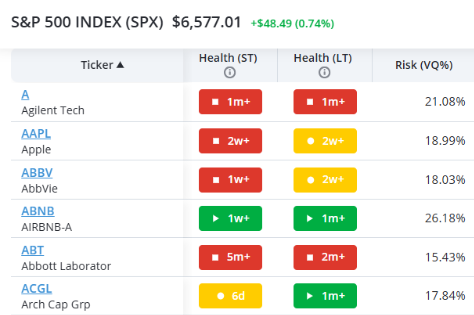
Above you can see a sample of S&P 500 stocks and their recent Health status, both long- and short-term, plus VQ.
- Note that Agilent Technology (A) is double-red (both ST & LT), so investors and traders alike should consider avoiding the stock.
- AAPL is mixed. In the (LT) Health Yellow Zone, but (ST) Health is Red. This means you may want to avoid trading AAPL short term. But long-term Health is neutral, meaning if you already own the stock, it’s a “hold.”
- Airbnb (ABNB) is double-green, meaning traders and investors may both want to consider the stock.
The (ST) Health indicator can be thought of as a standalone “Flash” Buy-or-Sell system for short-term trades over the next few months, when the indicator turns green or red.
❗For Further Reading: I’ve written more extensively about TradeStops here and here, including the value of syncing your broker account with TradeSmith. Syncing allows you to automatically set TradeStops alerts for every security in your portfolio. That way, you’ll never miss another Health Indicator buy, sell, hold signal. (Don’t worry; we have bank-level security, so your information is safe._ And speaking of Health Signals, check out my deep dive into the Long- and Short-Term Health indicators here.
Mike Burnick’s Bottom Line: TradeStops helps you steer clear of unhealthy stocks that could lose money, and it can guide you toward healthy stocks that give you an edge to make more money. If you can employee TradeStops alone, it has the potential to make you a smarter, better investor or trader. And in our next “TradeSmith 101” session, I’ll cover how to find new investment and trading ideas with Trade360 and Ideas by TradeSmith. So, don’t skip class. See you then!
Good investing,
Mike Burnick
Senior Analyst, TradeSmith
P.S. We have put in a lot of work into our tools, algorithms, systems, and services of the past 21 years of TradeSmith. And we are always looking to improve what we have – and if there’s something we don’t have, we create it.
In fact, our team is hard at work prepping for our next big breakthrough…
And it all boils down to a powerful new application of AI.
I can’t say a whole lot more because we’re keeping this tightly under wraps…
But imagine knowing exactly how much money you could make on any given trade… how long the trade will likely last, and even the historical success rate.
All before you invest a penny.
I’ll put a pin in that for now, but make sure you stay tuned.